Beyond the Prompt: A 2026 Test of 5 AI PowerPoint Alternatives on Professional Standards

AI is everywhere, promising to create polished presentations from a single prompt. But after designing over 1.8 million slides for the world's leading companies, we know the critical question isn't about speed, but trust.
Are these tools just a gimmick, or can they be trusted with a company's most valuable asset—its brand? Can an AI-generated deck truly adhere to strict brand guidelines? And does it offer the granular design control professionals demand?
To provide a definitive answer, this project was a close collaboration between our R&D department, led by Head of R&D Mira Marika, and our expert design team. Together, we tested the 5 leading AI alternatives to PowerPoint, measuring them on what truly matters to businesses: CVI compliance, design capability, and professional suitability. This is our official report.
Here are the topics we'll cover:
- The Benchmark: Our Professional Evaluation Framework
- The Showdown: A Head-to-Head Analysis of 5 AI Alternatives to PowerPoint
- At-a-Glance: The Final Scoreboard
- The Final Verdict: Are These Tools Ready for Professional Use?
- Frequently Asked Questions (FAQ)
- About Our Research
- Beyond AI: Flawless Design & Uncompromising Security
The Benchmark: Our Professional Evaluation Framework
This year's framework is a direct evolution from our previous research on the 10 best AI presentation makers. While that analysis focused on prompt-based generation, this new methodology goes deeper to measure a tool's ability to meet true professional design standards.
To do this, our expert design team collaborated with our R&D specialists to co-develop the six weighted criteria below. This framework reflects the real-world demands of a professional corporate environment and is the foundation of our entire report.
"We wanted to see more than just features. We needed to know if these tools could actually fit into a professional workflow and support the precision we deliver at an enterprise level. Our goal was to test if AI is ready for the shifting landscape of client preferences."
— Mira Marika, Head of R&D at 24Slides
Here is the exact framework we used to test each of the five AI alternatives to PowerPoint.
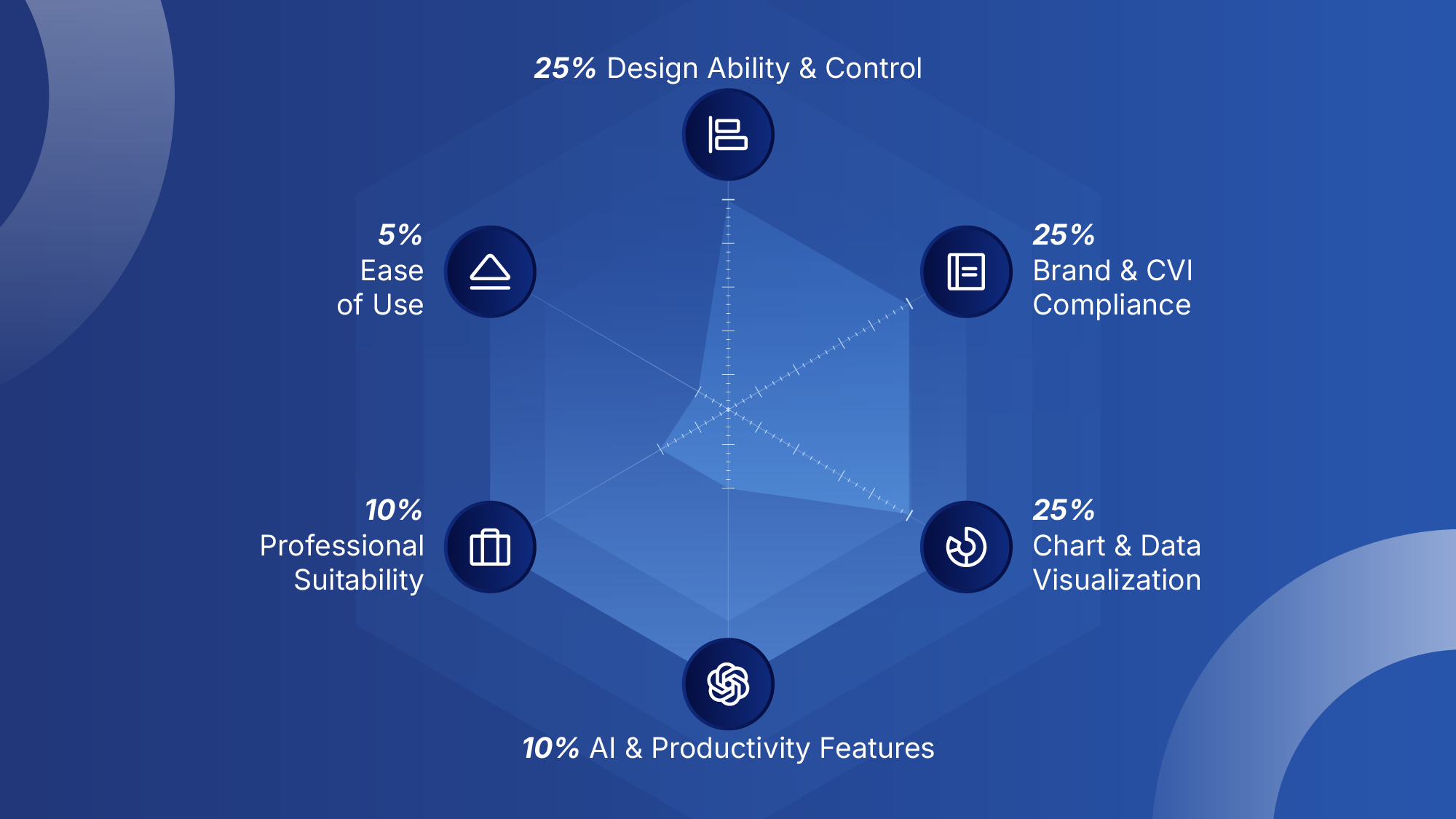
Design Ability & Control (Weight: 25%)
This is the core of our test, measuring a tool's power beyond the initial AI prompt. We evaluated its capacity for the creative and technical work required for high-quality, bespoke presentations.
- What we tested: We evaluated the platform's layout flexibility, support for custom graphics and vector control, and the availability of granular design control for precise object manipulation. All benchmarked against the standards set by PowerPoint.
- Why it matters: This is the difference between a generic template and a presentation that can truly represent a brand's unique visual identity.
Brand & CVI Compliance (Weight: 25%)
A presentation tool is only effective if it can uphold and scale a company's brand. This criterion measured how well each platform could be configured to enforce strict Corporate Visual Identity (CVI) standards.
- What we tested: We analyzed how each tool handles official brand kits, the ability to upload and use custom templates, and crucial features such as font management, to ensure 100% brand consistency.
- Why it matters: Robust CVI compliance empowers entire teams to create on-brand content. After all, your brand identity is what separates your brand from others. This prevents the brand dilution that plagues many organizations.
Chart & Data Visualization (Weight: 25%)
Modern business presentations are all about charts and graphics. We dedicated a significant portion of our scoring to the tool's ability to transform raw numbers into clear, compelling, and on-brand visuals.
- What we tested: Our team assessed the entire data visualization workflow, from data import and chart creation to the ability to customize colors, fonts, and layouts to ensure full brand compliance.
- Why it matters: A tool that cannot produce clear, accurate, and professional-looking charts cannot be considered a true alternative for serious business use.
AI & Productivity Features (Weight: 10%)
This criterion separates genuine productivity boosters from marketing gimmicks. We evaluated whether a tool's "smart" features actually accelerate a professional workflow.
- What we tested: We analyzed the quality and relevance of AI-generated text and layouts, as well as the image generation tools and the software's ability to improve efficiency.
- Why it matters: The right AI features save valuable time in the drafting and ideation phases. The wrong ones create more corrective work for a designer.
Professional Suitability (Weight: 10%)
This is our holistic score for a tool's readiness for a high-stakes corporate setting. We looked beyond design features to the overall reliability and security of the platform.
- What we tested: This score considers collaboration features, export quality, platform stability, and the availability of enterprise-grade security protocols.
- Why it matters: This answers the ultimate question for any manager or executive: Can this tool be trusted for a client-facing presentation where your brand and reputation are on the line?
Ease of Use (Weight: 5%)
While raw power is key, a tool must be accessible to the team using it. This score reflects the platform's learning curve and how intuitive it is.
- What we tested: We measured the time and friction of the onboarding process, the quality of available tutorials, and the overall user-friendliness of the interface.
- Why it matters: A lower learning curve means faster team adoption, greater consistency, and a quicker return on investment.
The Showdown: A Head-to-Head Analysis of 5 AI Alternatives to PowerPoint
Now, let's see how these tools measure up to their promises. Our R&D and design teams rigorously tested five of the most prominent AI alternatives to PowerPoint, each claiming to be the new standard for presentation design.
You can read our full analysis for each contender below, or jump directly to the one you're most interested in:
Each tool was scored against our official framework to see how it truly measures up. Here is our detailed analysis, starting with Gamma.
Gamma
The AI-first platform for generating beautiful documents and presentations with incredible speed.
The Key Difference: Gamma's core philosophy is AI-assisted design. Unlike PowerPoint's manual, control-oriented canvas, Gamma is built to let you focus solely on your content and then "beautify" the entire presentation with a single click.
Design Ability & Control
Gamma's approach to design is a fundamental trade-off: it sacrifices the user's manual control for AI-driven structure and speed. Our designers found that while this leads to visually impressive results almost instantly, it comes at a high cost to the creative freedom required for professional, bespoke work. The features were ultimately insufficient for our daily corporate design work.
Key Limitations:
- Rigid, Block-Based System: As we explored in our comparison of AI Presentation Makers vs. Professional Designers, this is a common trade-off in AI tools. Unlike PowerPoint's free-form canvas, objects cannot be freely moved or layered. A critical example is the inability to resize images or videos placed inside a card, locking them into a predetermined size.
- Limited Custom Graphics: The platform lacks support for custom design elements. While you can copy objects from PowerPoint, they are converted to a static bitmap (JPG) format, losing all editability. The built-in icon library is also limited, making it hard to find specific visuals.
Unique Control Features:
Despite these limitations, Gamma does offer some unique features not found in PowerPoint. Our designers noted the useful column adjustment features and an "emphasis" feature to highlight key points. The most interesting was the ability to create pop-up buttons that reveal more content when clicked, allowing for interactive, layered storytelling within a slide.
Brand & CVI Compliance
The platform's core design limitations create significant challenges for enforcing strict CVI compliance. Gamma does offer a clever "Theme" creation feature that could benefit solopreneurs, but our tests concluded it lacks the robust controls needed for true brand consistency in a corporate environment.
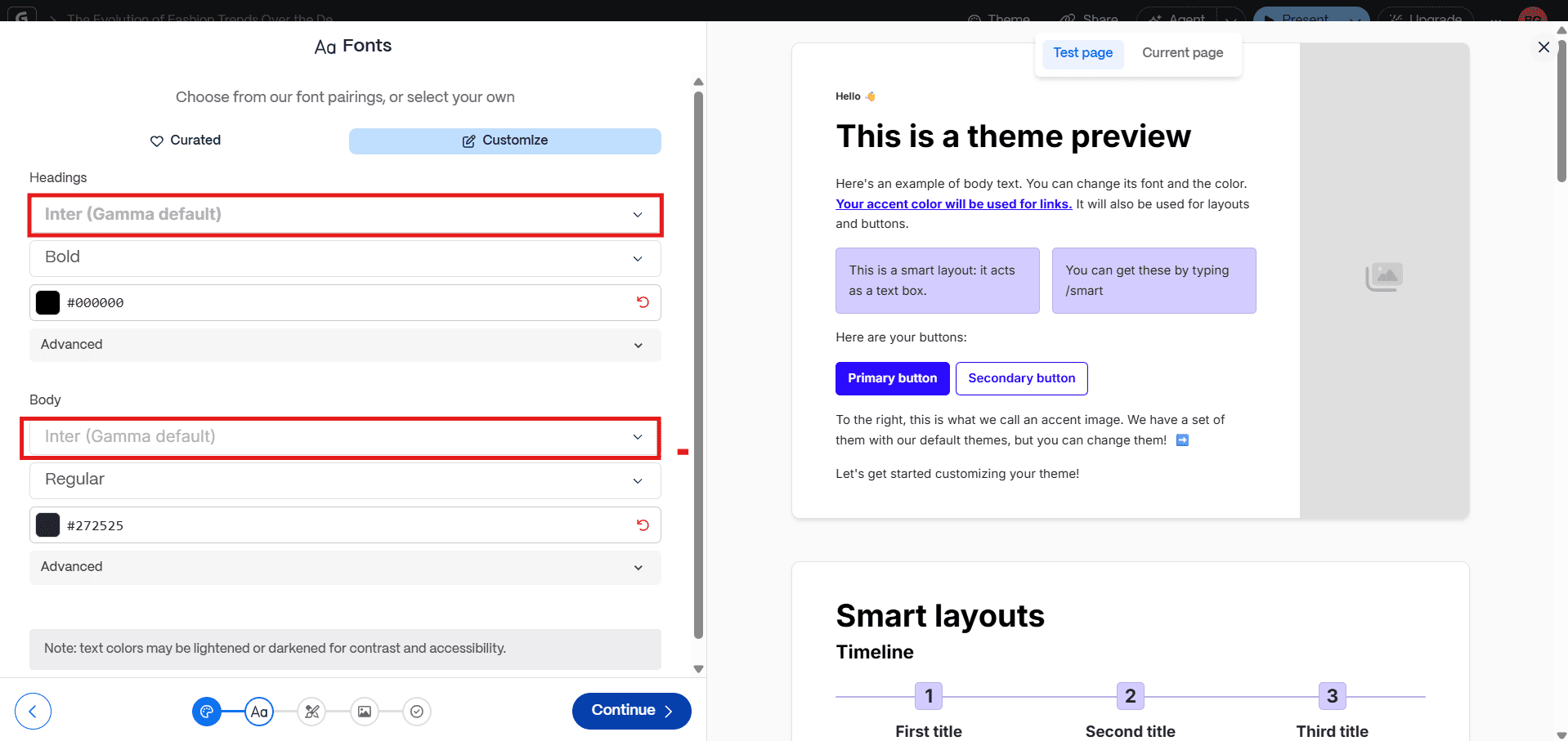
Gamma's theme generator is impressive at a surface level; it can even attempt to auto-generate a theme by uploading an existing deck. However, when put to the test against professional brand guidelines, we identified several critical limitations.
Key Limitations:
- Paywalled Brand Features: Crucial features for corporate branding, such as uploading a custom font or logo, are locked behind the paid "Pro" plan.
- Strict Font Limitations: Even with a paid plan, a theme is restricted to only two fonts (one for headings, one for body), which is a significant constraint for complex brand guidelines. Moreover, the font sizes are limited: small, medium, and large.
- No Locked Elements: There is no way for a brand manager to lock down key template elements, creating a high risk of non-designers making off-brand alterations.
Chart & Data Visualization
Creating data visualizations in Gamma is a story of speed versus customization. While the platform is fast for generating simple, automated charts, it lacks the flexibility needed for professional, on-brand reporting.
The platform offers a good variety of diagrams, including Gantt charts. However, the customization options are minimal. For anything beyond a basic chart, our designers found they had to resort to manually constructing tables piece by piece using the "blank diagram" feature—a process that is far less efficient and powerful than PowerPoint's native tools.
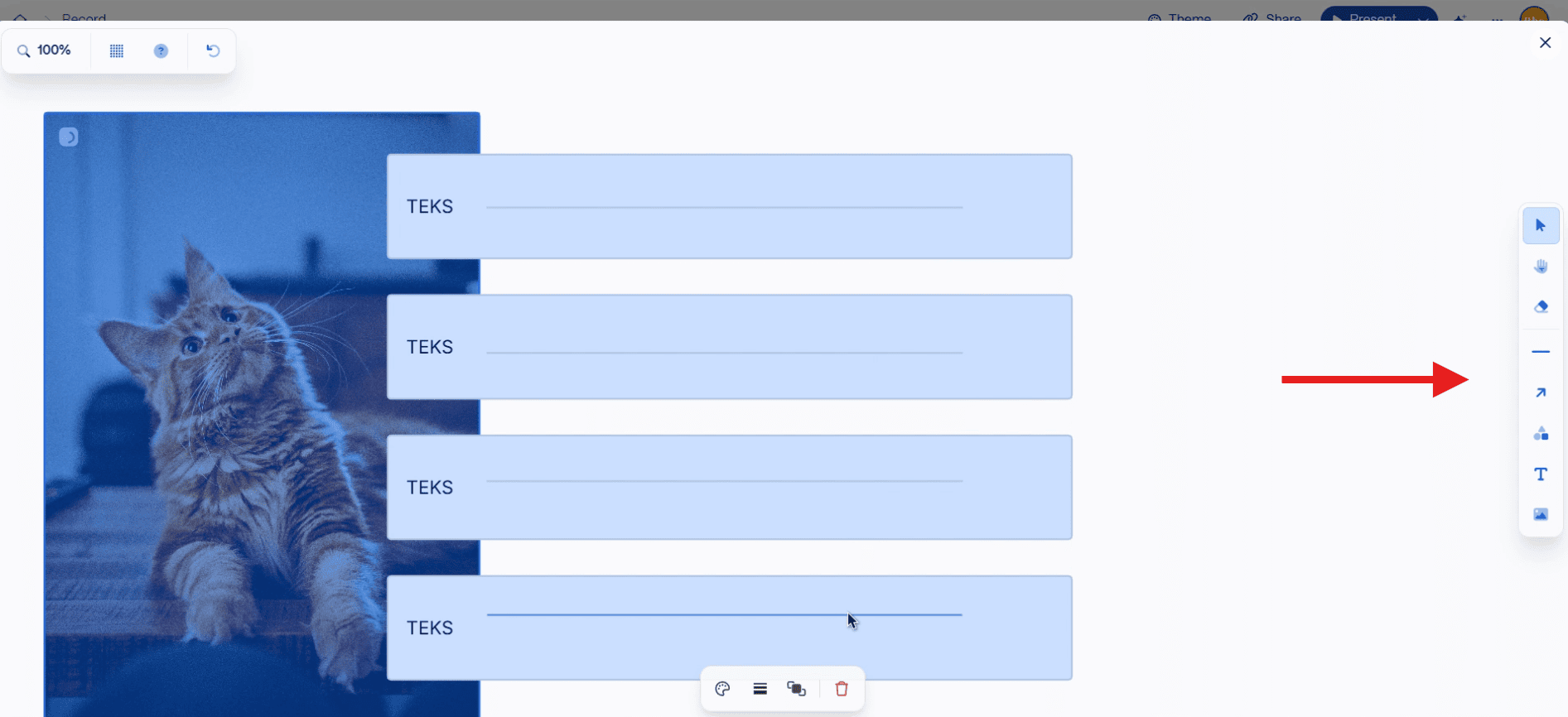
Key Findings:
- Limited Customization: As demonstrated by the manual workaround required, the ability to fully customize charts and tables to match specific brand guidelines is a significant weakness. Options to adjust fonts, colors, and layouts are minimal.
- Missing Chart Types: The platform is missing key chart types required for business reporting, such as stacked charts, forcing these inefficient manual solutions.
- Best for Simple Data: The tool's automated charts are suitable for quick, internal presentations, but they do not meet the standard for high-stakes, client-facing data visualization that requires custom work.
AI & Productivity Features
This is where Gamma truly shines, offering an AI Agent that acts as a co-pilot for the entire creation process, a workflow fundamentally different from PowerPoint's. From generating a deck with a prompt to editing and styling on the fly, this Agent is designed to accelerate you to a finished draft
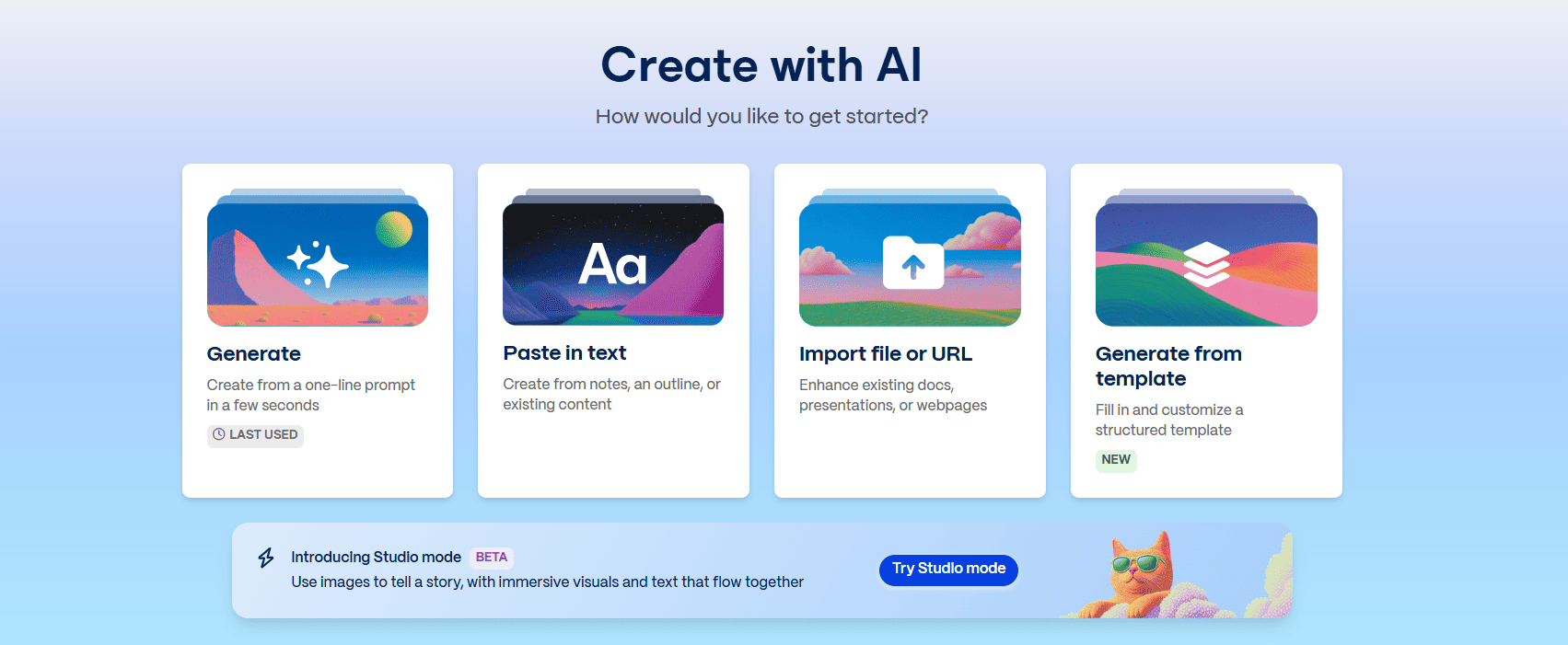
Standout AI Agent Capabilities We Tested:
- Deck Generation: This is Gamma's signature feature. The ability to have the AI Agent create a complete, well-structured presentation on any topic from a single text prompt is a massive leap in productivity for initial ideation.
- Conversational Editing: Once a draft is created, the AI Agent acts as your editor. You can use a chat-like interface to ask it to edit content by rewriting text, adjusting the tone, or summarizing complex points. This is a powerful and intuitive feature for refining your message.
- One-Click Styling: The AI Agent also functions as a stylist. With a single click, you can ask it to "beautify" a card or change the entire theme, allowing for rapid visual experimentation.
- Immersive Storytelling with Studio Mode (Beta): A new feature, "Studio Mode," allows users to create more immersive, visually-driven layouts that flow like a web page, further differentiating it from traditional slide-based tools.
Professional Suitability
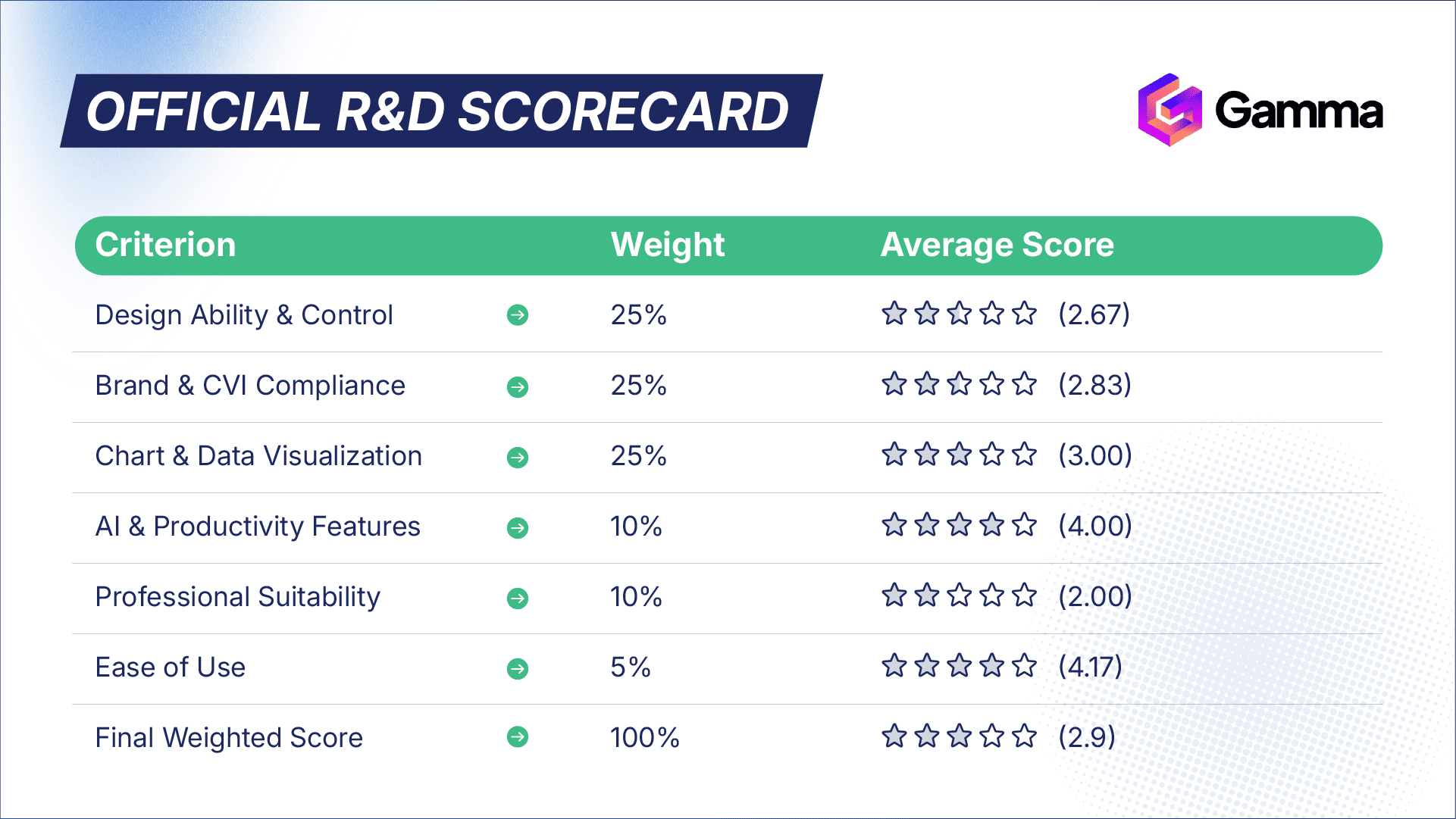
Our team gave Gamma a Professional Suitability score of 2.0 out of 5. This low score reflects critical gaps in its readiness for a high-stakes corporate environment.
The software often speeds you up in the initial drafting phase, but slows you down during final production due to its limitations. We encountered several issues that impact its reliability, such as intermittent errors when uploading images that required a page refresh.
Furthermore, the inability to directly upload your own video files (requiring you to use embeds) is a significant security and workflow concern for any company with confidential video assets.
"Gamma still needs consideration on using it daily, especially for corporate needs, since it is hard to do an advanced customization."
— The 24Slides R&D and Design Team
Ease of Use
Gamma excels in user support, which contributes to its high Ease of Use score. The platform offers a dedicated tutorials page with videos and maintains an active YouTube channel showcasing the latest features. This robust support system, combined with a clean and intuitive interface, ensures a seamless onboarding process. Our designers found the learning curve to be very gentle, allowing them to start creating content almost immediately.
Who Is Gamma For? (The Verdict)
Ideal For:
- Internal Teams, Academics, & Consultants who need to create beautiful, content-rich documents and reports at high speed, where strict brand adherence is less critical.
- Anyone needing to generate a visually appealing first draft from a long document or notes.
- Non-designers who want a guided experience to produce a polished-looking presentation quickly, as the AI tools and ready-to-use templates make it very easy.
Not Recommended For:
- Corporate Marketing & Brand Teams that require strict CVI compliance and advanced customization.
- Creative Agencies & Professional Designers who need full creative control and cannot be constrained by a rigid, block-based system.
- Regulated & High-Security Industries: We do not recommend Gamma for sectors like Pharmaceutical, Biotech, Consumer Healthcare, or Financial Services. In these industries, security and governance are non-negotiable. Gamma's current platform lacks the enterprise-grade security features and the deep brand control required for this type of compliance-heavy, brand-critical work.
- Sales Teams needing to create bespoke, high-impact pitches that are 100% on-brand and may contain sensitive data.
Want a Broader Look at Gamma?
This analysis focused on Gamma's performance against our professional R&D framework. For a comprehensive overview of all its features, pricing, and general use cases, read our full, in-depth Gamma Review.
Slidebean
The AI-powered pitch deck builder for startups and non-designers who prioritize speed and structure over custom design.
The Key Difference: Slidebean's core philosophy is enforced simplicity. Unlike PowerPoint's extensive customization, Slidebean provides a more straightforward, restrictive interface designed to guide non-designers toward a clean, minimalist presentation. Our analysis below explores whether this trade-off is suitable for a professional corporate environment.
Design Ability & Control
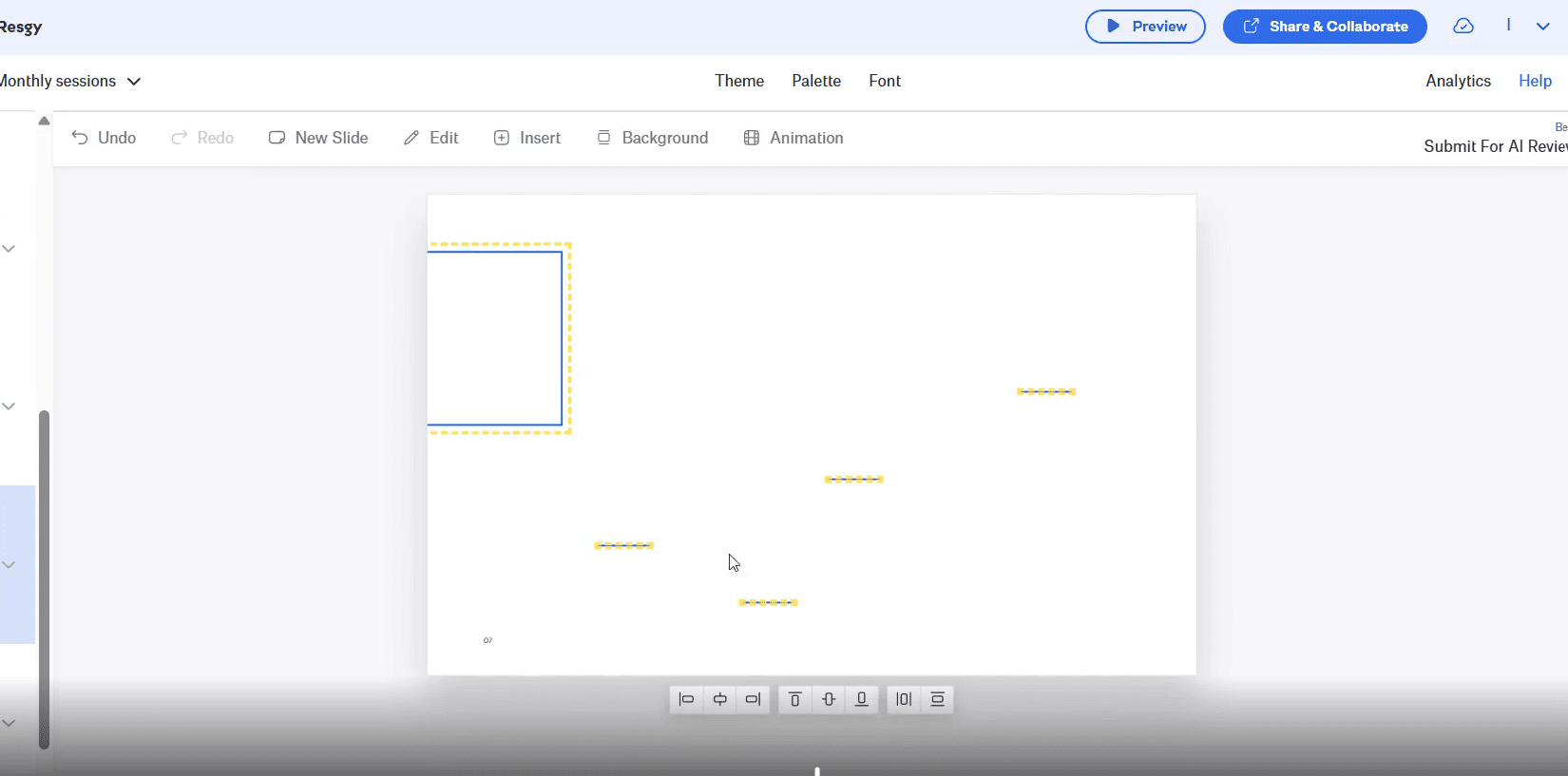
Our designers found Slidebean's features to be insufficient for professional design work. The platform is fundamentally limiting, lacking the basic tools and flexibility required for creating custom, on-brand presentations. We encountered several bugs and workflow issues that would significantly slow down a professional designer.
Key Findings:
- Lack of Essential Design Tools: A major feature missing that hinders design creation is a proper set of guidelines and rulers. The inability to group objects or manually set the presentation size are critical omissions for any serious design work.
- Significant Object Control Issues: The design process was frequently frustrating. Copied objects always paste to the middle of the slide, and selecting multiple objects to move them together resulted in them moving randomly.
- Limited Custom Graphics: All imported elements are treated as static bitmaps, with no options for adjustment. The supply of basic shapes is minimal (e.g., no rounded rectangles), severely restricting custom graphic creation.
Brand & CVI Compliance
Slidebean offers a basic "Theme" section that provides a surface-level nod to branding, but it falls well short of the robust controls needed for true CVI compliance.
Key Limitations:
- Strict Font Limitations: While the ability to upload a custom font is a welcome feature, the platform immediately restricts its use to only two styles (one for headings, one for body). This is insufficient for any brand with a comprehensive typographic system.
- Inconsistent Element Placement: The lack of alignment tools and the copy/paste bug make it incredibly difficult to maintain consistent placement of brand elements (like logos or disclaimers) across multiple slides.
Chart & Data Visualization
The platform's approach to data visualization mirrors its overall philosophy: easy to start, but frustrating to customize. While the pop-up window for data input is user-friendly, the final output lacks professional polish.
Our team found the options for changing colors, line styles, and font sizes to be minimal. The inability to set specific values for table dimensions is a critical flaw, making it impossible to create precise, brand-compliant data tables.
AI & Productivity Features
Unlike other tools where AI is a genuine productivity booster, our team found Slidebean's AI features to be largely ineffective and, in some cases, counterproductive.
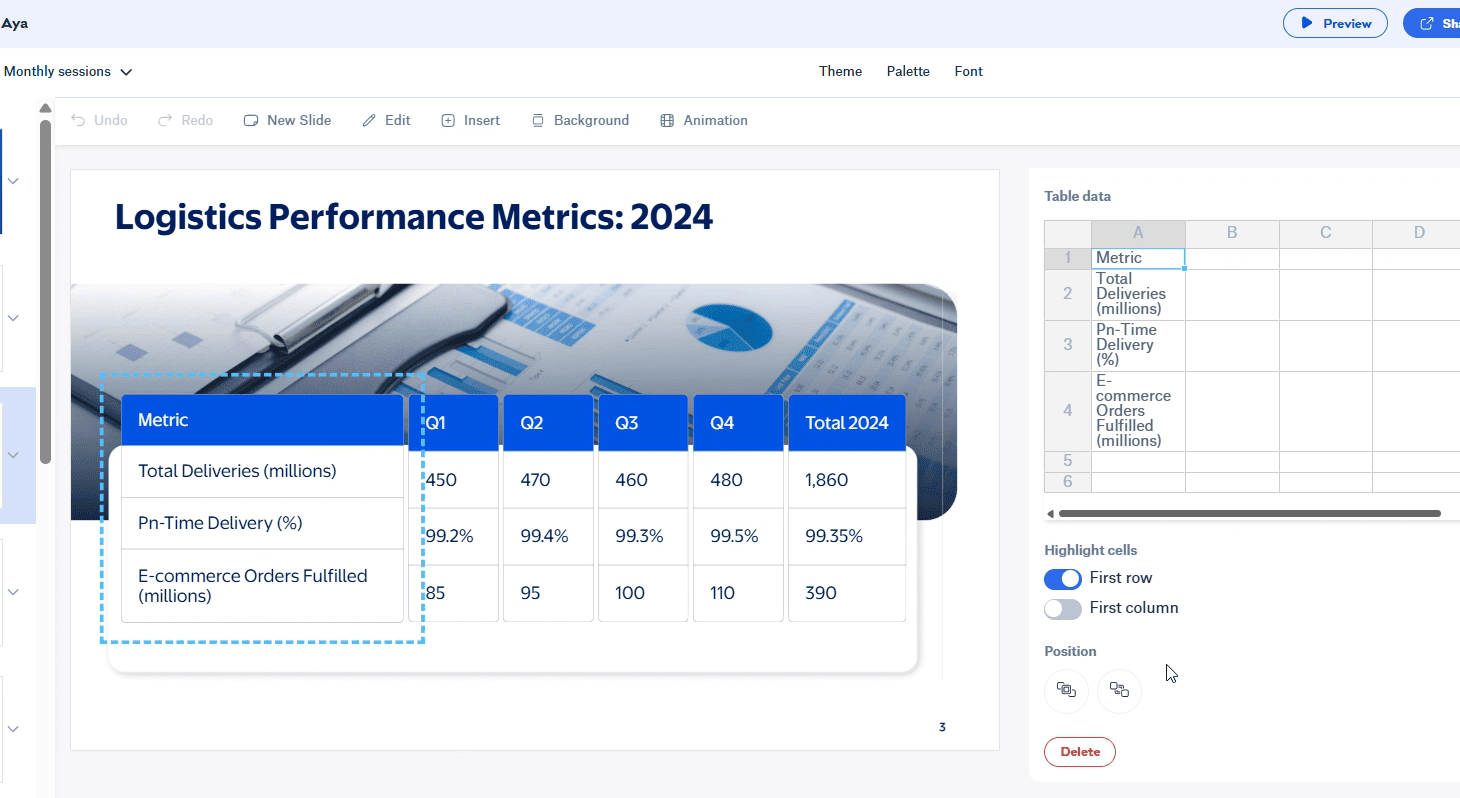
The result of using Slidebean's "auto design" feature. Instead of improving the layout, the AI consistently produced disorganized and overlapping elements that created more work for our designers.
Key Findings:
- Ineffective "Auto Design": The "auto design" button, which claims to arrange content, consistently produced disorganized and randomly placed elements that required manual cleanup. This feature did not help the design process at all.
- Simple Content Scraping: The "AI Pitch Deck Builder" feature, which generates a deck from a website link, simply scraped the text content without intelligent structuring or design, offering little value beyond a simple copy-paste.
Professional Suitability
Slidebean's numerous limitations and bugs make it unsuitable for our daily professional needs. The software slowed our designers down due to the constant need to fight against its object control issues and lack of basic tools. The disorganized output from its AI features and the absence of a PPT import function are significant red flags for any corporate environment.
Ease of Use
Slidebean is very easy to use, primarily because of its simplicity. For someone without a design background, the limited toolset can be a benefit, as it prevents them from making complex design mistakes and saves time. The platform also provides tutorials and videos to guide users.
However, a massive drawback for any professional workflow is the complete lack of a PowerPoint import feature. This makes it impossible to work with existing corporate presentations, a critical failure for enterprise adoption.
Who Is Slidebean For? (The Verdict)
Ideal For:
- Startups & Entrepreneurs who need to quickly generate a simple, templated pitch deck and are not concerned with deep customization.
- Non-designers who benefit from a restrictive environment that enforces a minimalist design.
- Students or individuals creating simple, one-off presentations.
Not Recommended For:
- Corporate Marketing & Brand Teams that require brand consistency and have established presentation templates.
- Professional Designers or Creative Agencies who would be severely hindered by the lack of granular design control, alignment tools, and grouping features.
- Regulated & High-Security Industries: We do not recommend Slidebean for sectors like Pharmaceutical, Biotech, or Financial Services. The inability to directly upload private video files is a major security and governance concern, making the platform unsuitable for compliance-heavy, brand-critical work.
- Any company that needs to import and work with existing PowerPoint files.
Visme
The all-in-one visual content platform for creating interactive presentations, infographics, and data visualizations.
The Key Difference: Visme's core philosophy is interactive visual design. Unlike PowerPoint's focus on traditional slide structures, Visme is built to create modern, web-ready, and data-driven visual content, feeling like a hybrid of a design tool and a presentation maker. Our analysis below explores its suitability for a professional corporate environment.
Design Ability & Control
Our designers found Visme's features to be a mix of impressive power and frustrating limitations. The user interface feels familiar to users of Adobe products and PowerPoint, offering a wide array of tools. However, numerous bugs, performance issues, and missing core functionalities make the design process less efficient than it could be.
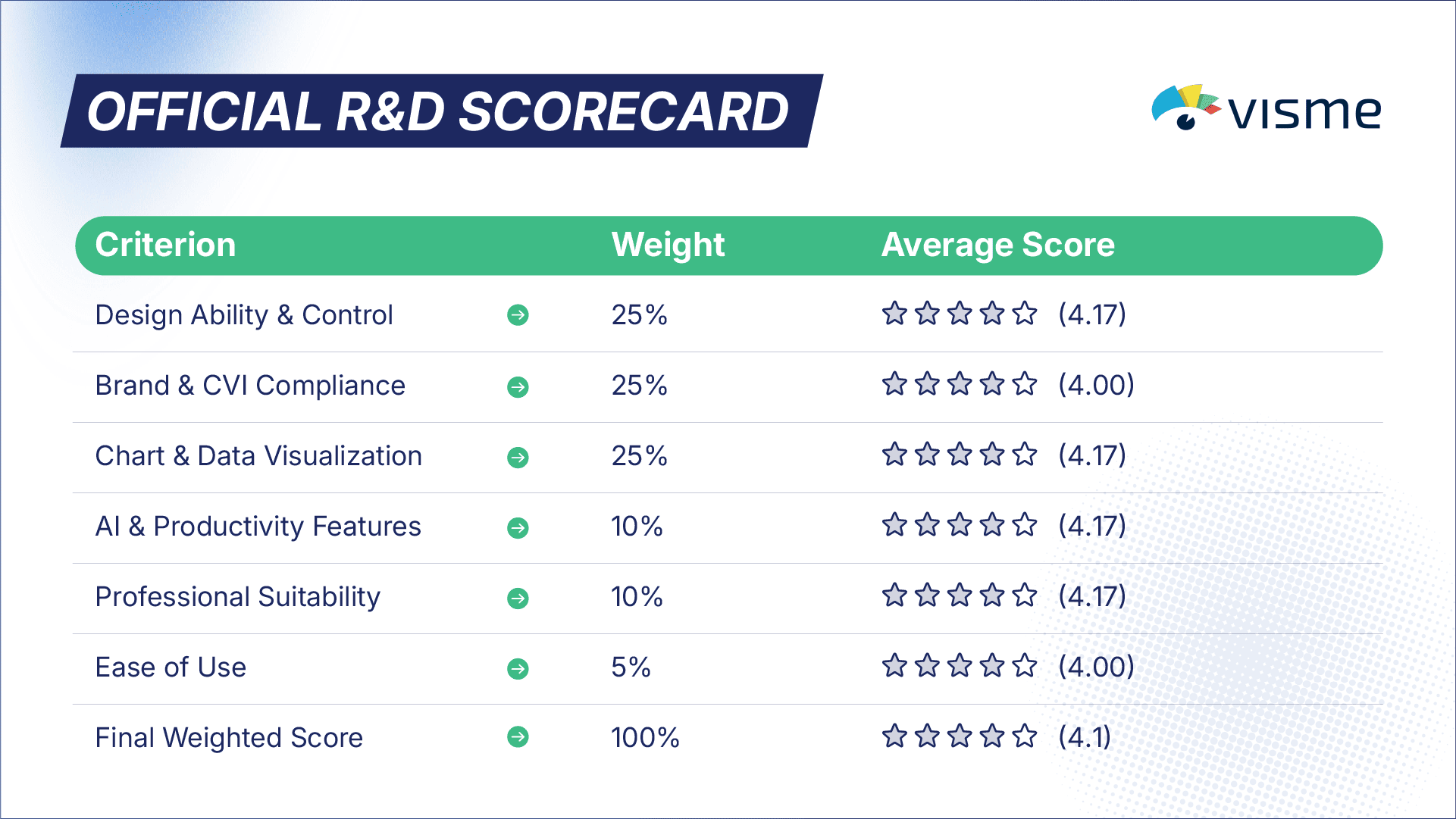
A screen recording of a recurring bug our team encountered in Visme. Selecting and moving multiple objects at once often caused them to scatter unpredictably, making precise layout nearly impossible.
Key Findings:
- Powerful Layout Tools with Flaws: Visme offers professional tools like rulers and smart guides for precise control. However, these are hindered by frustrating quirks: guidelines cannot be locked or applied across all slides, and they don't reset to the center, requiring manual calculations for margins.
- Numerous Object Control Bugs: The platform suffers from several bugs that hinder design creation. Our team experienced issues with objects shifting in groups, inaccurate "distribute" functions, and errors when changing the color of multiple objects at once.
- Missing Core Functionality: Critical features for professional design, such as a "copy style" (format painter) tool and the ability to merge shapes, are completely absent. Furthermore, keyboard shortcuts are very limited, slowing down the workflow for power users.
Brand & CVI Compliance
Visme offers a promising set of features for CVI compliance, but many of the most critical tools are locked behind expensive subscriptions, and some fundamental limitations remain.
Key Findings:
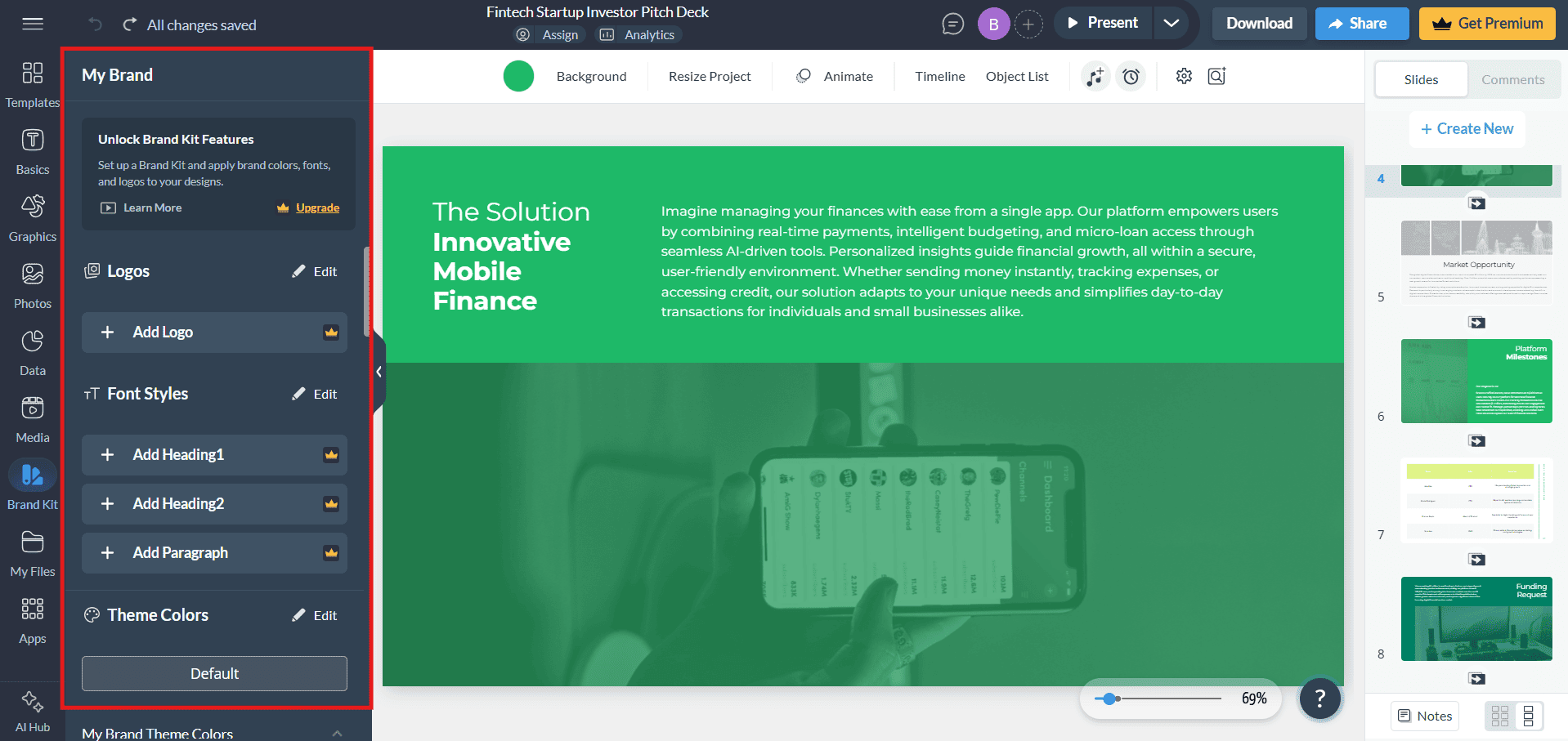
- Paywalled Brand Controls: Essential features for corporate branding, such as the ability to upload and use a custom font, are only available after upgrading to a "Business" level account.
- Clever but Limited "Brand Wizard": Visme has an impressive feature that can generate brand assets by pulling styles from a website URL. However, the output is a starting point and still requires significant manual adjustment.
- Limited Font & Color Palettes: Even with a paid plan, color palettes do not have built-in options for shades or tints, requiring manual input for every variation. The platform is also limited to two primary fonts per theme.
Chart & Data Visualization
Visme excels at creating visually engaging and interactive data content, offering a wide array of data visualization tools, diagrams, and even 3D charts. This is one of its core strengths.
However, the platform struggles with performance and deep customization. Our 24Slides team noted that slides with complex charts became heavy and slow, and some charts with large fonts failed to display correctly at all. Customization is also limited, as you cannot manually select individual text elements within a chart to adjust them, and resizing charts can cause content to be cut off.
Despite not having deep customization options, Visme excels at creating visually engaging data content. It offers advanced features, such as animated 3D charts, that are not available on most other platforms.
AI & Productivity Features
Our team found Visme's current AI features to be in a very early stage and not particularly helpful for a professional design workflow.
Key Findings:
- Basic Generative Design: The AI presentation generator is still in development. It was unable to handle detailed prompts effectively and produced very basic, generic slides.
- Niche AI Writer: The AI Writer is a functional tool for generating or updating copy, which could be useful for copywriters. However, for designers, it is not an essential feature and does not significantly help the design process.
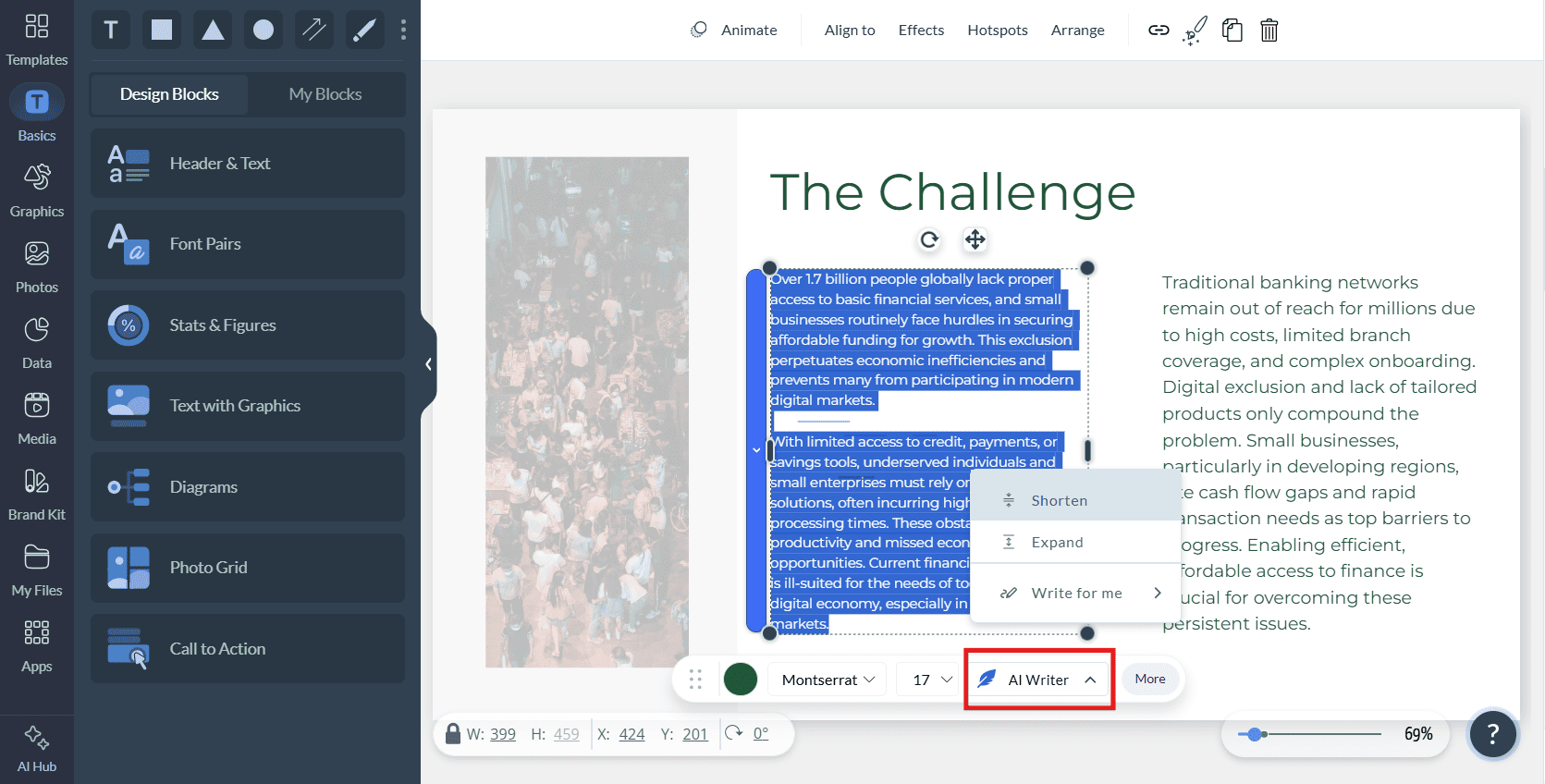
Visme's AI Writer is a functional tool for generating or updating copy directly within a text box, which can be helpful for content-focused roles.
Professional Suitability
While Visme excels in visual and infographic-based design, its frequent performance lags and numerous bugs make it a frustrating tool for daily professional use. It slowed our designers down as they constantly had to fight against object control errors and platform instability. The paywalling of essential features like custom fonts and the lack of a PPT export are also major barriers to corporate adoption.
Ease of Use
Visme has a moderately steep learning curve due to its extensive feature set, which feels like a mix of Adobe, PowerPoint, and a video editor. The platform provides extensive support with internal and external video tutorials.
A major drawback for corporate workflows is the lack of a PowerPoint export feature. While you can import PPTX files, the inability to export back to this universal format is a significant limitation for enterprise collaboration.
Who Is Visme For? (The Verdict)
Ideal For:
- Marketers & Social Media Managers who need an all-in-one tool to create a wide variety of visual content, from infographics to social media posts.
- Educators & Individuals creating visually rich, interactive, and web-ready content that doesn't require deep brand consistency.
- Teams looking for a powerful complementary tool to PowerPoint for specific data visualization or infographic projects.
Not Recommended For:
- Corporate environments that require stable performance, deep structural control, and enterprise-wide consistency.
- Regulated & High-Security Industries: We do not recommend Visme for sectors such as Pharmaceuticals or Biotech. The platform's performance instability and frequent bugs present an unacceptable risk for the reliable creation of compliance-heavy, brand-critical work.
- Professional Designers who would be frustrated by the numerous bugs, missing core features, and unreliable object controls.
- Any team that relies on a seamless workflow with PowerPoint, especially the need to export editable .pptx files.
Want a More Comprehensive Look at Visme?
This report analyzed Visme's performance against our professional R&D framework. For a detailed overview of all its features, pricing, and general use cases, read our complete Visme Review.
Presentations.ai
The AI-native presentation generator designed to create complete, visually appealing decks with maximum speed and minimal manual effort.
The Key Difference: Presentations.ai's core philosophy is its deep integration of a dynamic AI assistant. While other tools primarily use AI for initial generation, Presentations.ai's "Clip-E" helper actively guides the user throughout the editing process, offering contextual suggestions such as generating an agenda or rewriting content based on the current slide.
Our analysis below explores how this highly assisted workflow trades granular design control for speed.
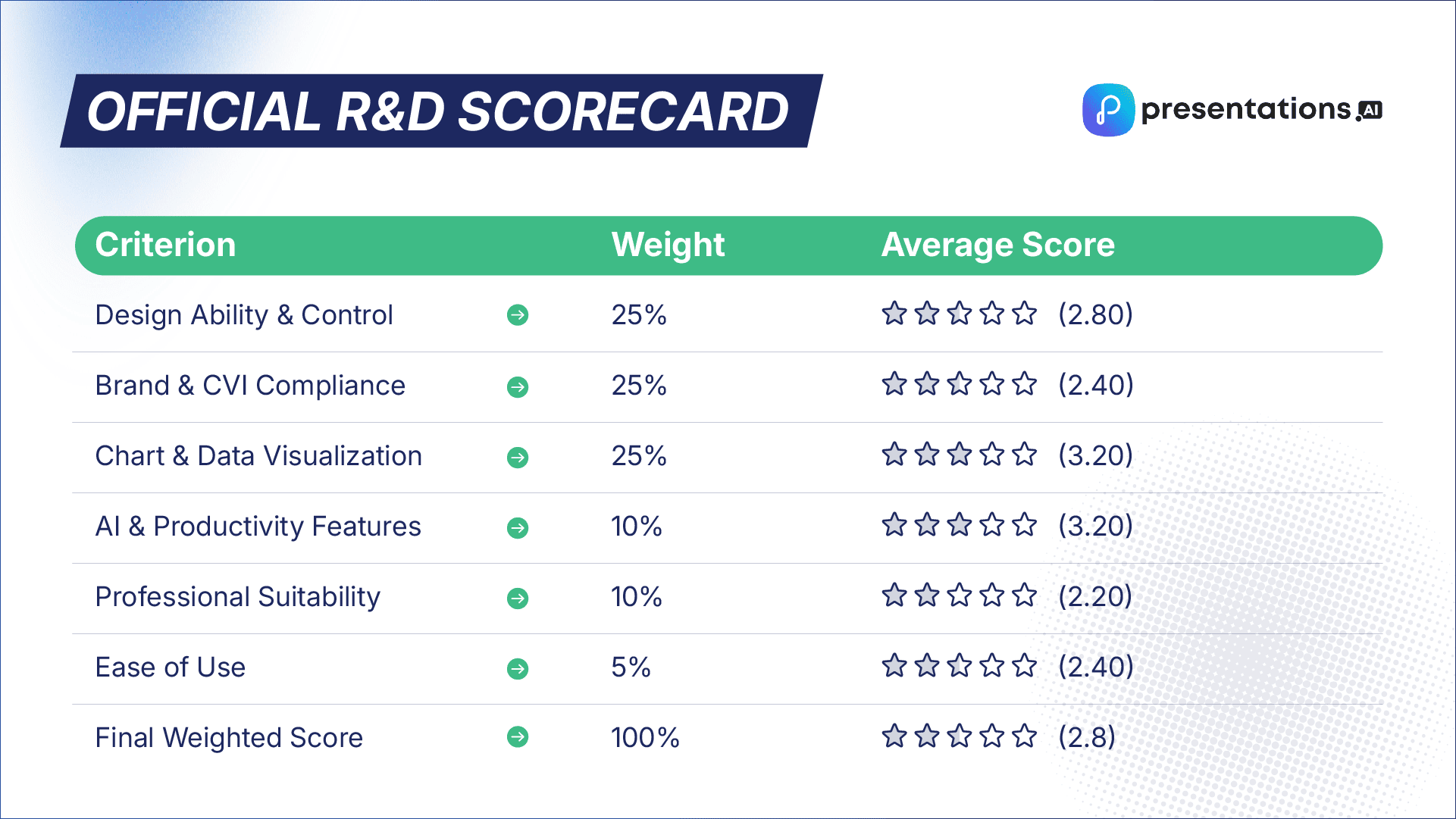
Design Ability & Control
Our designers found that Presentations.ai is a powerful assistant for generating slides but a frustrating editor for designing them. The platform's heavy reliance on its "Smart Layout" system means that the features are insufficient for professional design work that requires precision and creative freedom.
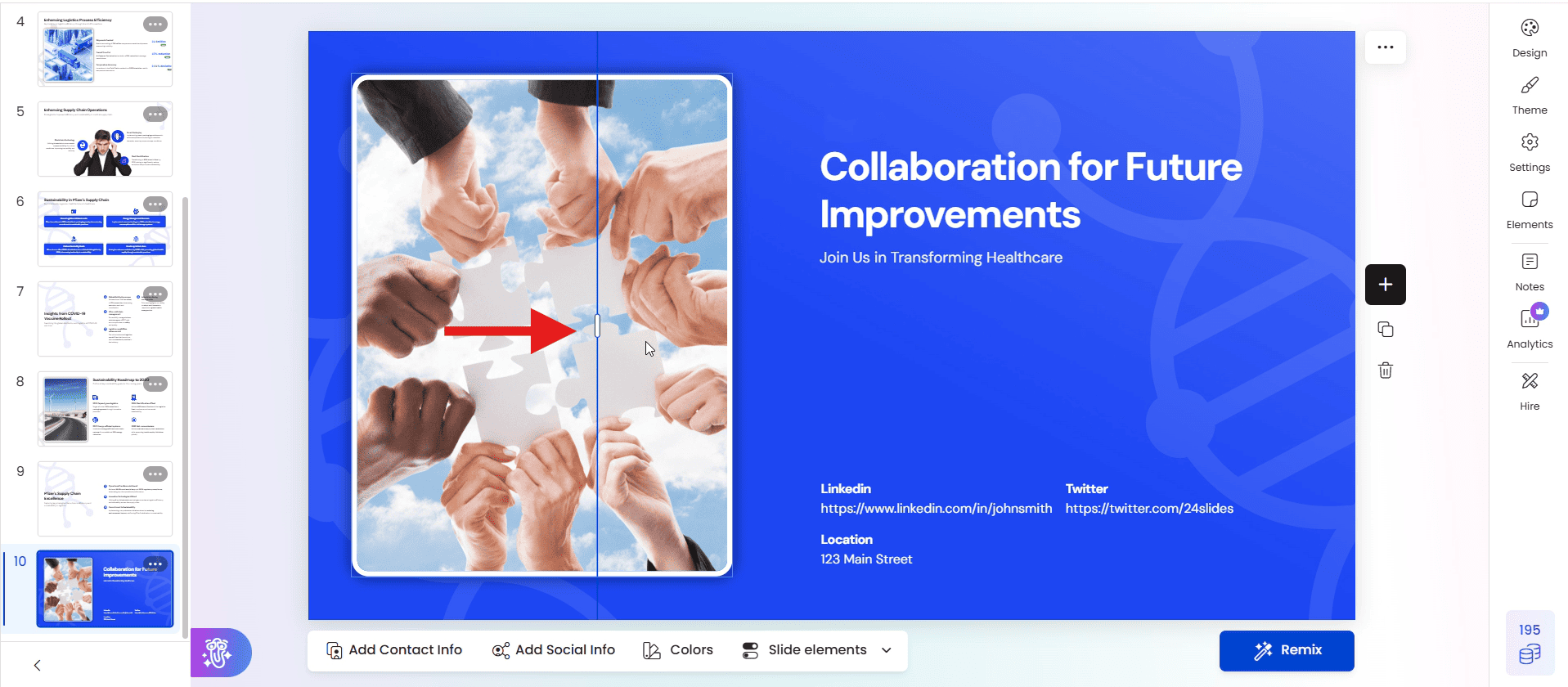
Key Findings:
- Over-reliance on Smart Layouts: The Smart Layout system dictates almost everything. Our team found that this system hinders design creation by limiting how freely objects can be moved and preventing the addition of content in certain layouts.
- Lack of Fundamental Design Aids: A major drawback is the complete absence of rulers, guidelines, and smart guides, leaving precise alignment to guesswork. The inability to zoom in and out of the workspace further complicates detailed design work.
- Frustrating Workflow & Keyboard Issues: Basic keyboard shortcuts like Ctrl+C/V and the arrow keys for moving objects do not work, forcing designers to rely on slower, on-screen buttons. Deleting an element with the backspace key deletes the entire slide, a major workflow flaw.
Brand & CVI Compliance
Presentations.ai offers several clever AI-driven features to assist with branding, but these are often superficial and lack the robust controls needed for true CVI compliance in a corporate environment.
Presentations.ai includes a clever "Contrast Logo Colors" feature that automatically adjusts the logo for better visibility, a unique tool for maintaining brand presence.
Key Findings:
- Paywalled Brand Controls: Essential features for corporate branding, such as custom color palettes and the ability to upload a custom font, are locked behind a "Pro" account.
- Impressive but Flawed AI Branding: The AI can suggest themes based on your company email or generate a deck from your website, but the results are inconsistent. Our team noted that logos were often cropped incorrectly, and their position could not be changed.
- No Master Template: The absence of a master template feature makes it impossible to enforce brand consistency for elements like headers and footers across an entire presentation.
Chart & Data Visualization
The platform allows for the manual creation of tables and charts, but the tools are very limited. Customization is almost non-existent, making it difficult to create on-brand data visualizations.
Despite its limitations in deep customization, Presentations.ai excels in one unique area of data visualization. Its table feature allows users to embed visual elements like icons, logos, and status indicators directly into cells, making data more engaging at a glance.
Key Limitations:
- Fixed Styling: Chart colors are locked to the chosen design style's palette and cannot be edited manually. Table styles are similarly rigid and cannot be customized.
- Functionality Loss: A critical flaw is that when a slide is "ungrouped" for manual editing, the charts and tables lose their function and become static content, making data updates impossible.
- Hard Limits on Content: The platform enforces a maximum of two charts per slide, and some chart types, like pie charts, have a limit on the number of data points.
AI & Productivity Features
This is the core strength of Presentations.ai. The AI is not just a feature; it is an integrated assistant that guides the user throughout the creation process.
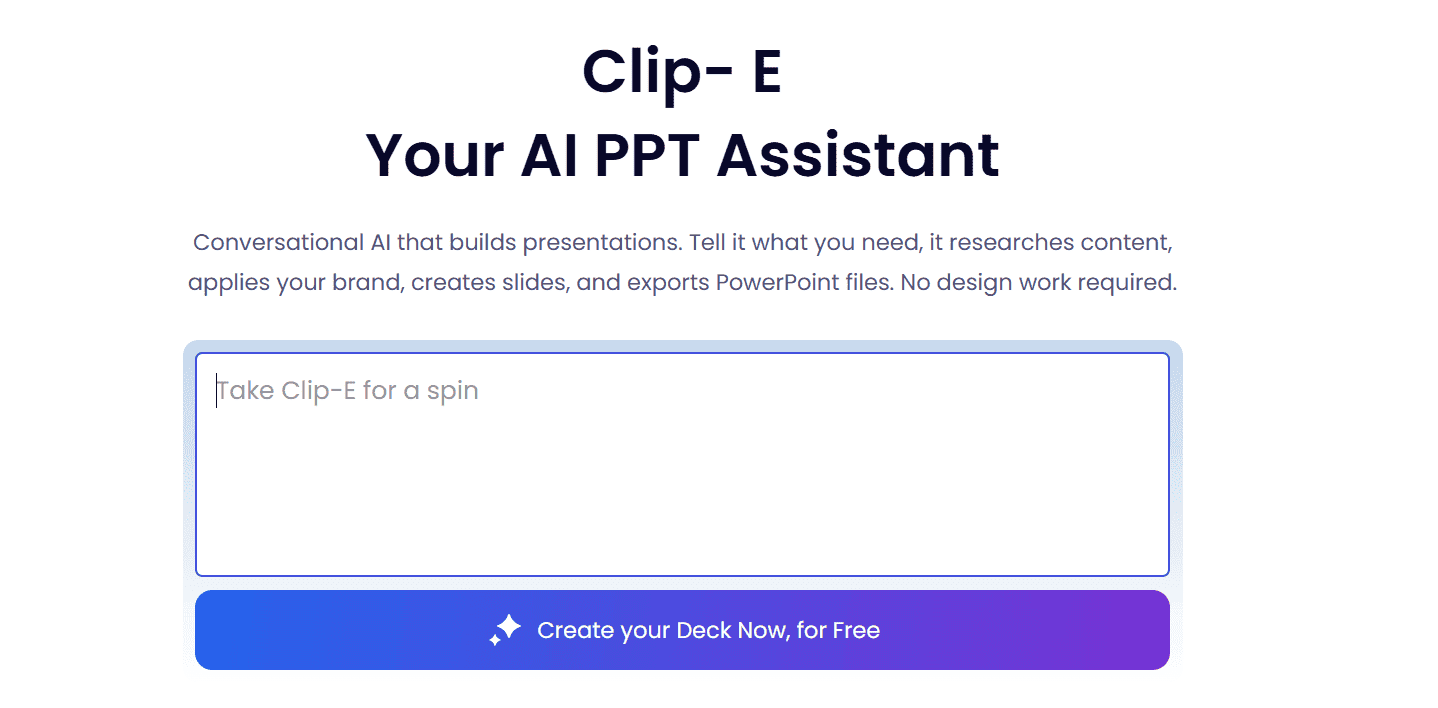
Key Features:
- "Clip-E" AI Assistant: This dynamic AI helper is a standout feature. It adapts its suggestions based on the slide content, offering to rewrite text, fix language, or even generate the next logical slide (like an agenda after a title slide).
- Powerful "Generate AI" Engine: The platform's ability to generate a full, multi-slide presentation from a simple prompt, a URL, and supporting documents is incredibly powerful and helps the design process by saving hours of initial setup.
- "Remix" for Design Alternatives: The "Remix" feature is a great tool for inspiration, offering alternative design layouts for an existing slide with a single click.
Professional Suitability
Presentations.ai offers fantastic speed for generating first drafts, but its lack of granular design control, numerous workflow frustrations (like broken keyboard shortcuts), and missing design aids mean it slowed our designers down during any customization phase.
While it offers creative assistance, PowerPoint remains the superior choice for detailed, complex design work that requires precision. The bug where slides could go missing on a refresh is also a major reliability concern.
Ease of Use
Presentations.ai is very easy to use for its intended purpose: AI generation. However, the onboarding process is hampered by a complete lack of a tutorials page or any internal/external videos, forcing users to learn by trial and error.
While it supports PPT import, the crucial PPT export feature is locked behind a premium subscription, a major barrier for professional teams who need to collaborate in a universal format.
Who Is Presentations.ai For? (The Verdict)
Ideal For:
- Users & Teams looking to save time and effort by generating high-quality first drafts of presentations quickly.
- Individuals who prioritize speed and AI-driven inspiration over detailed manual control.
- Anyone needing to quickly convert a website or document into a visually appealing presentation structure.
Not Recommended For:
- Professional Designers or Creative Agencies who require precise control, custom layouts, and a bug-free workflow.
- Corporate environments that need to enforce strict brand consistency through master templates and locked elements.
- Teams on the free plan who need to collaborate with PowerPoint users, due to the paywalled export feature.
Want a Broader Look at Presentations.ai?
This report focused on Presentations.ai's performance against our professional R&D framework. For a full overview of all its features, pricing, and general use cases, read our in-depth Presentations.ai Review.
Pitch
The collaboration-first presentation platform designed for modern teams, with a sleek interface and powerful workflow features.
The Key Difference: Pitch's core philosophy is real-time collaboration. Unlike PowerPoint's file-based, single-user default, Pitch is built from the ground up to feel like a "Google Slides for professionals," emphasizing teamwork, shared workflows, and a modern design aesthetic. Our analysis below explores how its design features stack up against the industry standard.
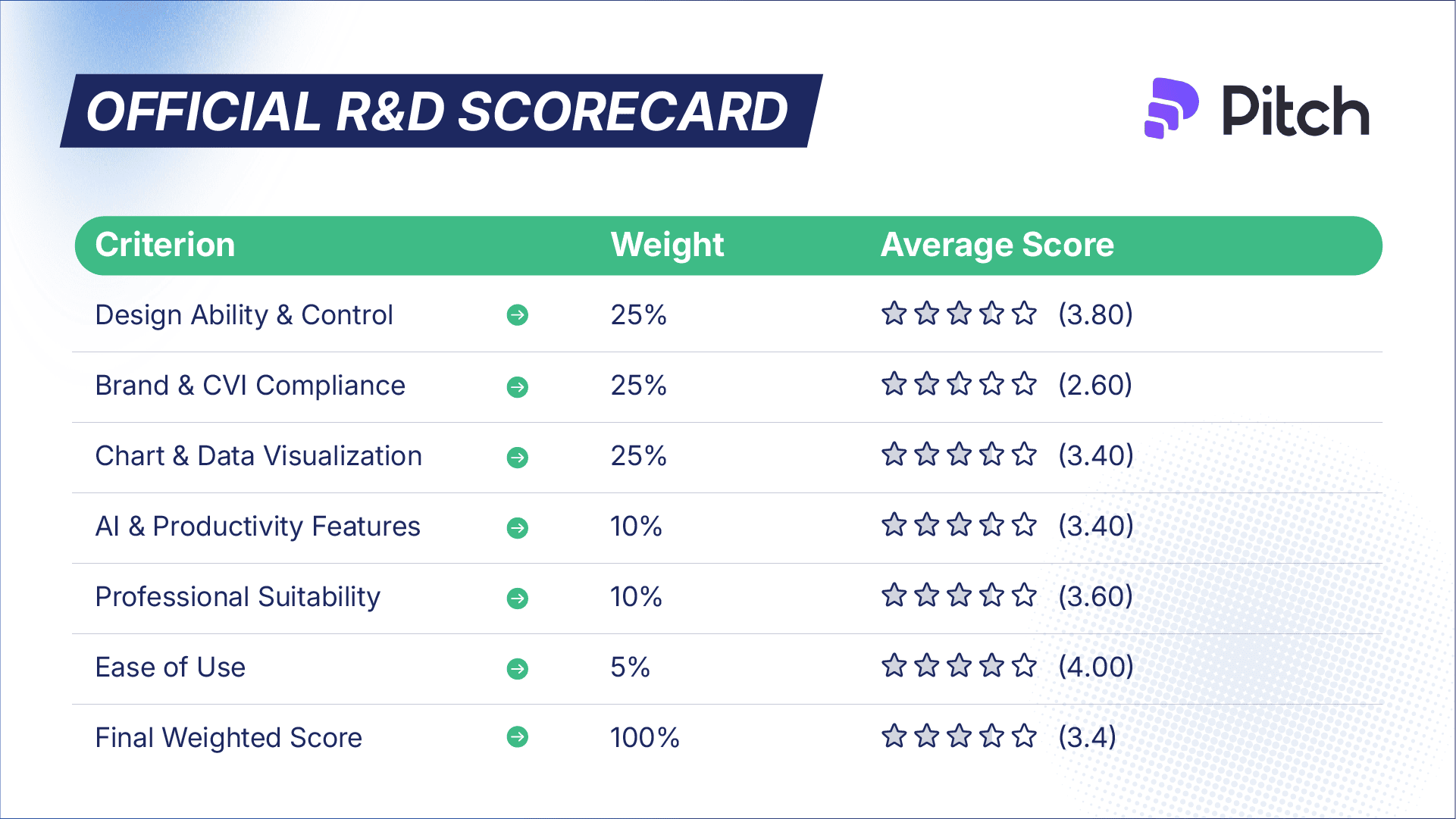
Design Ability & Control
Our designers found Pitch's interface to be clean, user-friendly, and familiar to anyone who has used Google Slides. The features are sufficient for most standard design work, but it lacks the deep, granular control that professionals rely on in PowerPoint.
Pitch's "Tidy" feature is a powerful idea for quick alignment, but our team found it to be inconsistent, often failing to work correctly depending on the initial position of the elements.
Key Findings:
- Smart but Limited Guides: The platform lacks traditional, lockable rulers and guidelines. Instead, it relies on "smart guides" that appear when moving objects. While helpful, this is less precise than a fixed grid system for complex layouts.
- Essential but Limited Graphics: Pitch provides essential shapes and customizable lines, but the selection is very small (only 6 basic shapes). While SVG files can be imported, they cannot be ungrouped to change individual colors, which is a major limitation.
- Missing Core Features: Two critical features that hinder design creation are the lack of a zoom function and the inability to set internal margins for text within a shape, forcing designers to use separate, layered text boxes.
Brand & CVI Compliance
Pitch offers a solid "Style" feature for basic branding, but critical customization options are locked behind a paid subscription, making it difficult to achieve full CVI compliance on the free plan.
Key Findings:
- Paywalled Custom Fonts: The ability to upload and use a custom brand font is a core requirement for corporate branding, and this feature is only available on an upgraded plan.
- Limited Color Palette: The main brand color palette is limited to a few primary colors. While individual objects can be customized, this makes it harder to enforce brand consistency across a large team.
- Innovative Logo Fetching: A unique feature is "Brandfetch," which can automatically pull a company's logo into the presentation, a nice time-saver for initial setup.
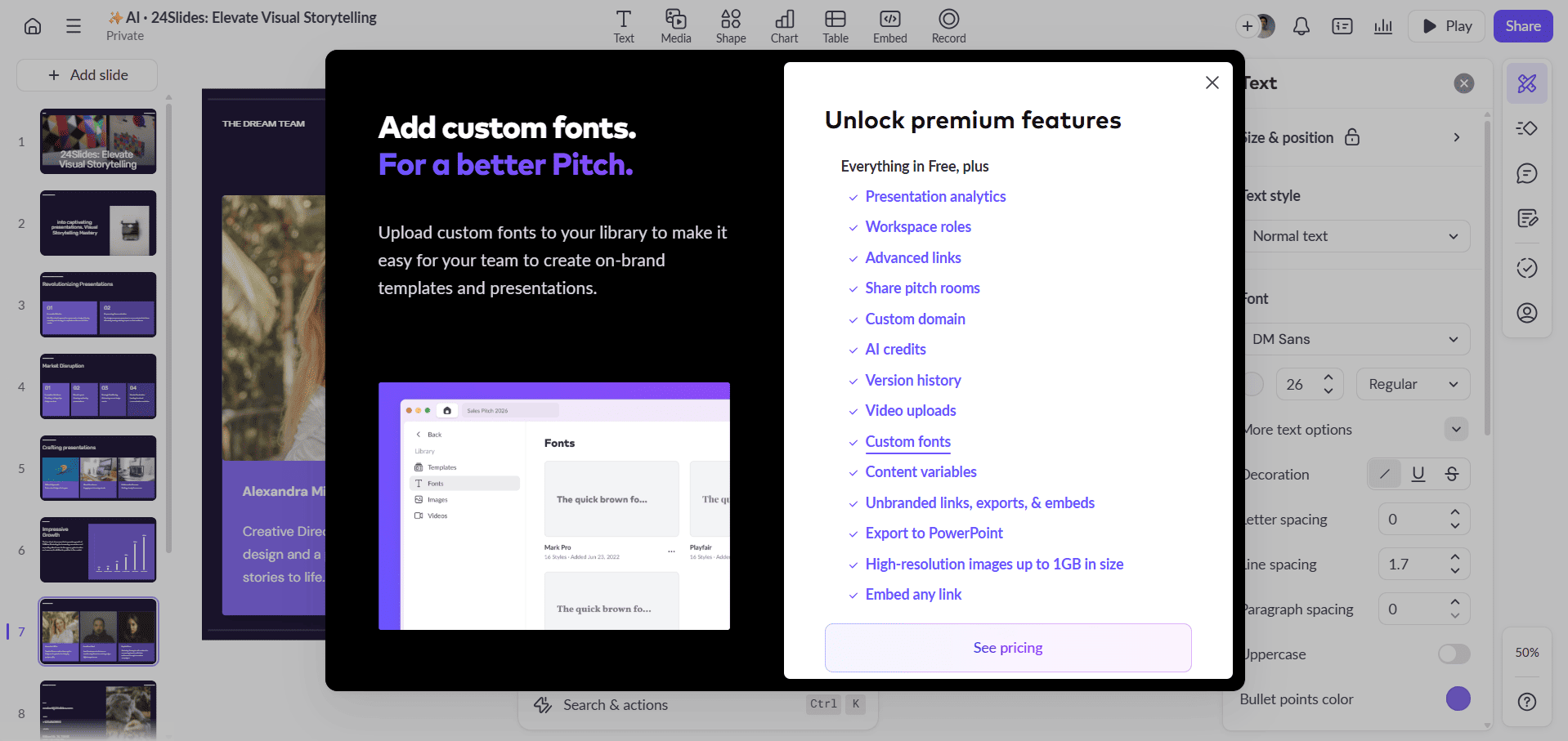
Chart & Data Visualization
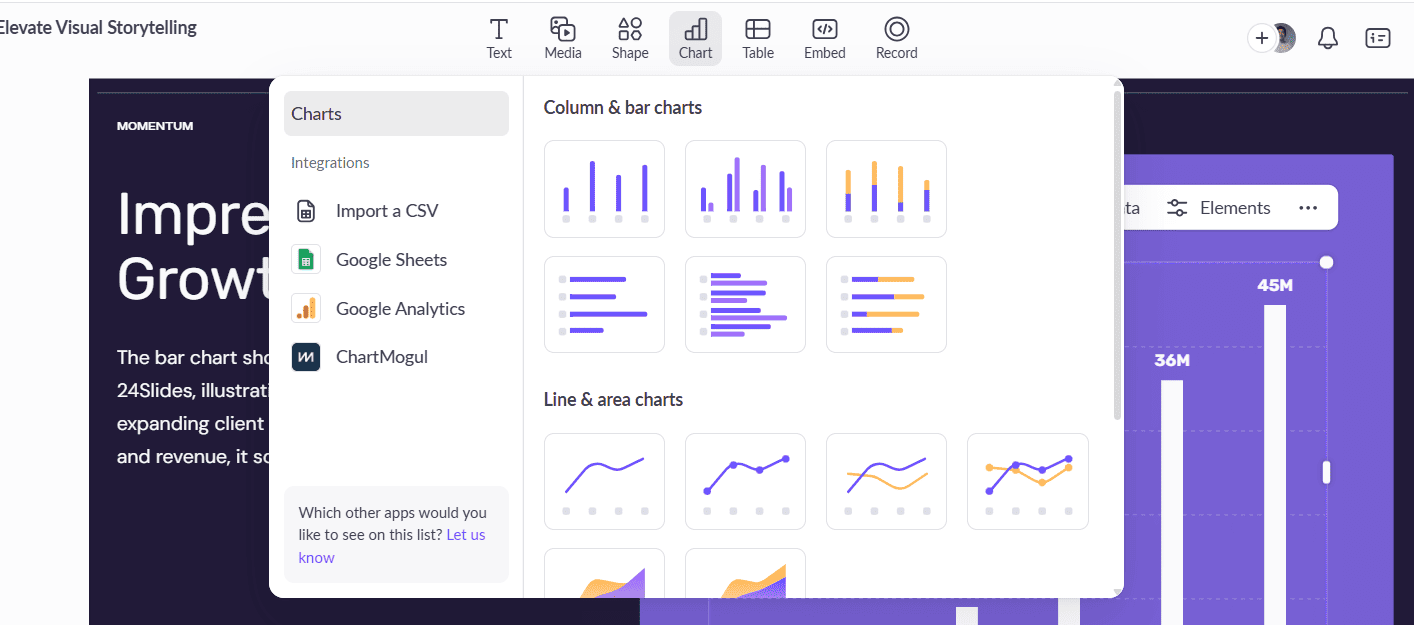
The platform's chart and table tools are a mix of modern strengths and frustrating limitations. Pitch excels at data integration, making it incredibly easy to create a chart from existing data sources.
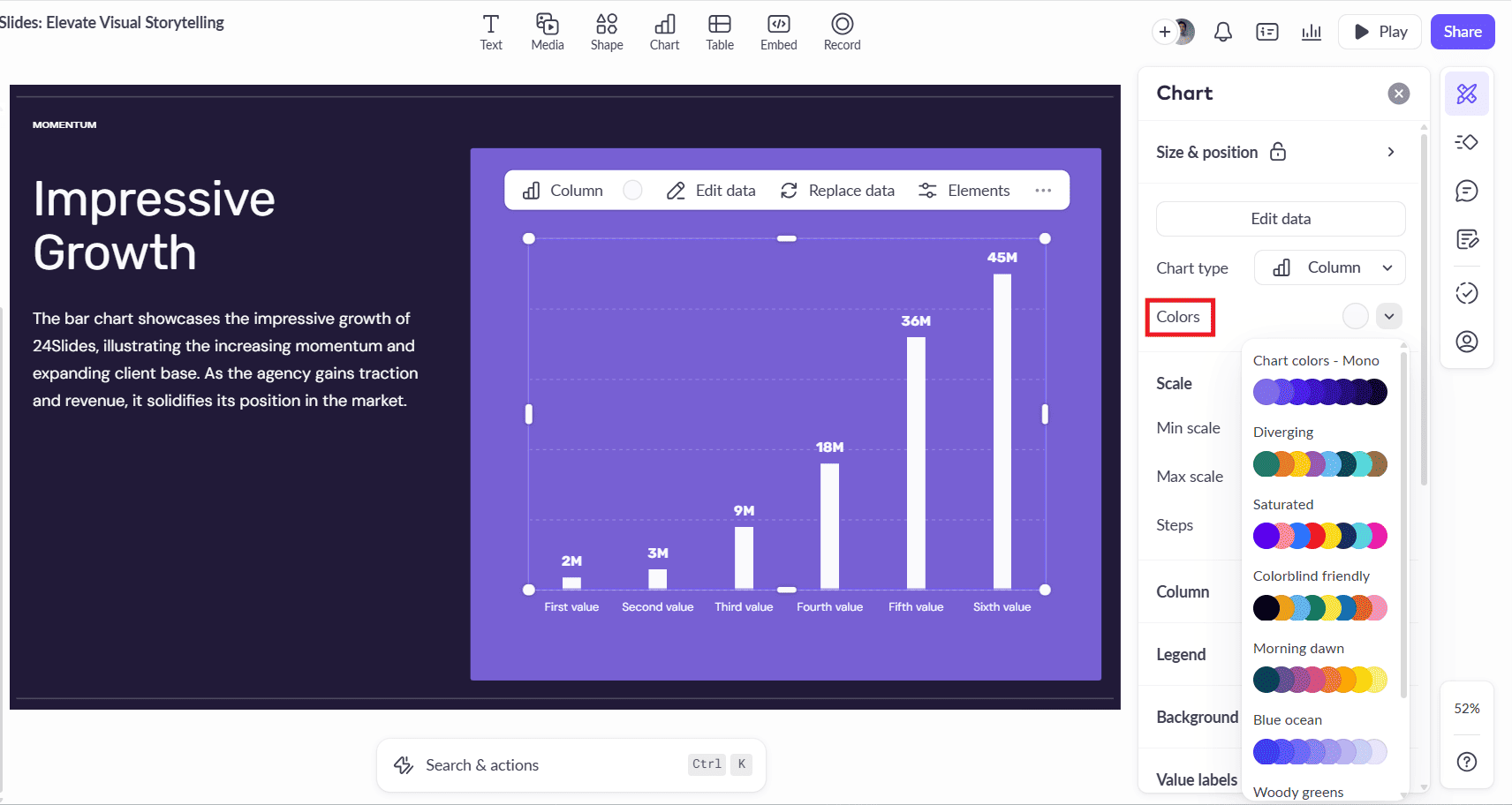
However, once the chart is created, the customization options are very limited, making it difficult to achieve full brand compliance or create detailed, professional data visualizations.
Key Findings:
- Powerful Data Integration: As shown above, Pitch's strength lies in its ability to import data directly from Google Sheets and Google Analytics, a major productivity boost.
- Limited Customization: The platform's customization options are a significant weakness. Our designers noted that it is impossible to change the colors of individual chart elements or, crucially, add an axis title—a fundamental requirement for clear data reporting.
- Legend Limitations: The chart legend also cannot be customized or repositioned, which significantly reduces the chart's effectiveness.
AI & Productivity Features
Our team found that Pitch's AI features are currently very limited and only accessible through a specific workflow. Unlike other tools, the AI is not an integrated assistant for editing existing presentations.
Key Finding:
- Generation-Only AI: The AI features can only be used when creating a presentation from scratch using the "Start with AI" prompt option. If you import an existing file or build a deck manually, the AI tools are not available to help the design process at all. This makes the AI much less useful for a professional workflow that often involves editing existing corporate decks.
Professional Suitability
Pitch is a highly suitable tool for modern teams that prioritize collaboration and a sleek, user-friendly interface. It speeds up the collaborative and review process significantly compared to PowerPoint. However, the limitations in deep design control, font management (on the free plan), and chart customization mean it may not be ready to fully replace PowerPoint for a dedicated corporate design team.
Ease of Use
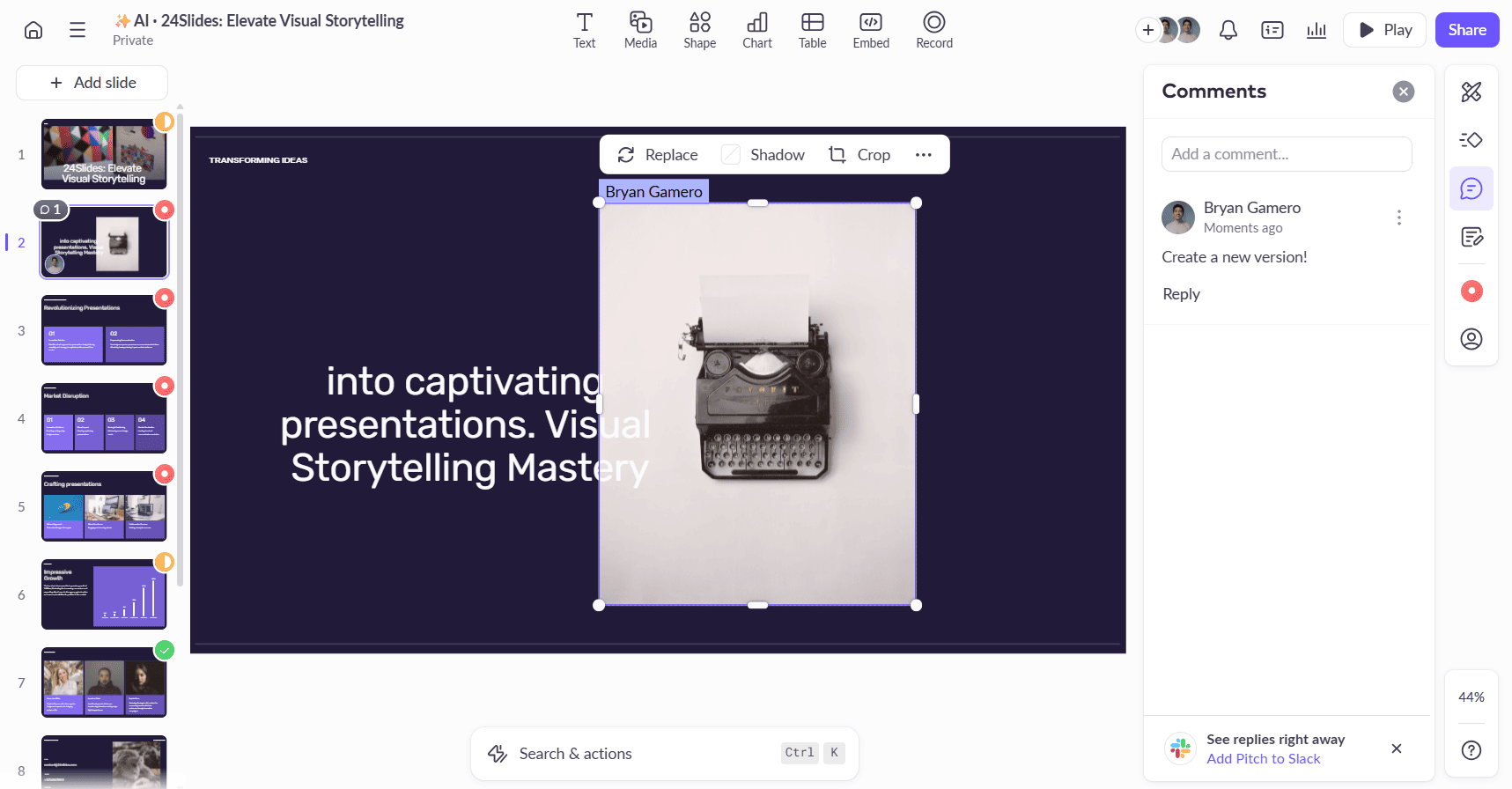
Pitch excels in ease of use, and its standout strength is a suite of powerful, intuitive collaboration tools that are deeply integrated into the workflow. This makes it an exceptional platform for managing team projects.
Key Strengths We Found:
- Powerful Collaboration: As shown above, real-time collaboration is flawless. The platform offers a full suite of professional workflow tools, including the ability to assign comments to specific team members and set a "Slide Status" (To Do, In Process, Done) to manage the project.
- Helpful Shortcuts & Features: Our designers also praised productivity boosters like the "Swap" feature for easily exchanging the position of two objects.
- Seamless PPT Workflow: The platform supports both PowerPoint import and export, making it easy to integrate into existing corporate workflows.
Who Is Pitch For?
Ideal For:
- Startups & Tech Companies who live in a collaborative, fast-paced environment and value a modern, G-Slides-like experience.
- Sales & Marketing Teams who need to work together in real-time on presentations and track their status.
- Non-designers who want a user-friendly interface that is less intimidating than PowerPoint.
Not Recommended For:
- Professional Designers who require granular design control, advanced shape editing, and a robust set of design tools.
- Corporate environments on the free plan that need to enforce strict brand consistency with custom fonts.
- Anyone needing to create highly detailed, customized data visualizations.
Want a Deeper Look at Pitch?
This report analyzed Pitch's performance against our professional R&D framework. For a complete overview of all its features, pricing, and general use cases, read our full Pitch Review.
At-a-Glance: The Final Scoreboard
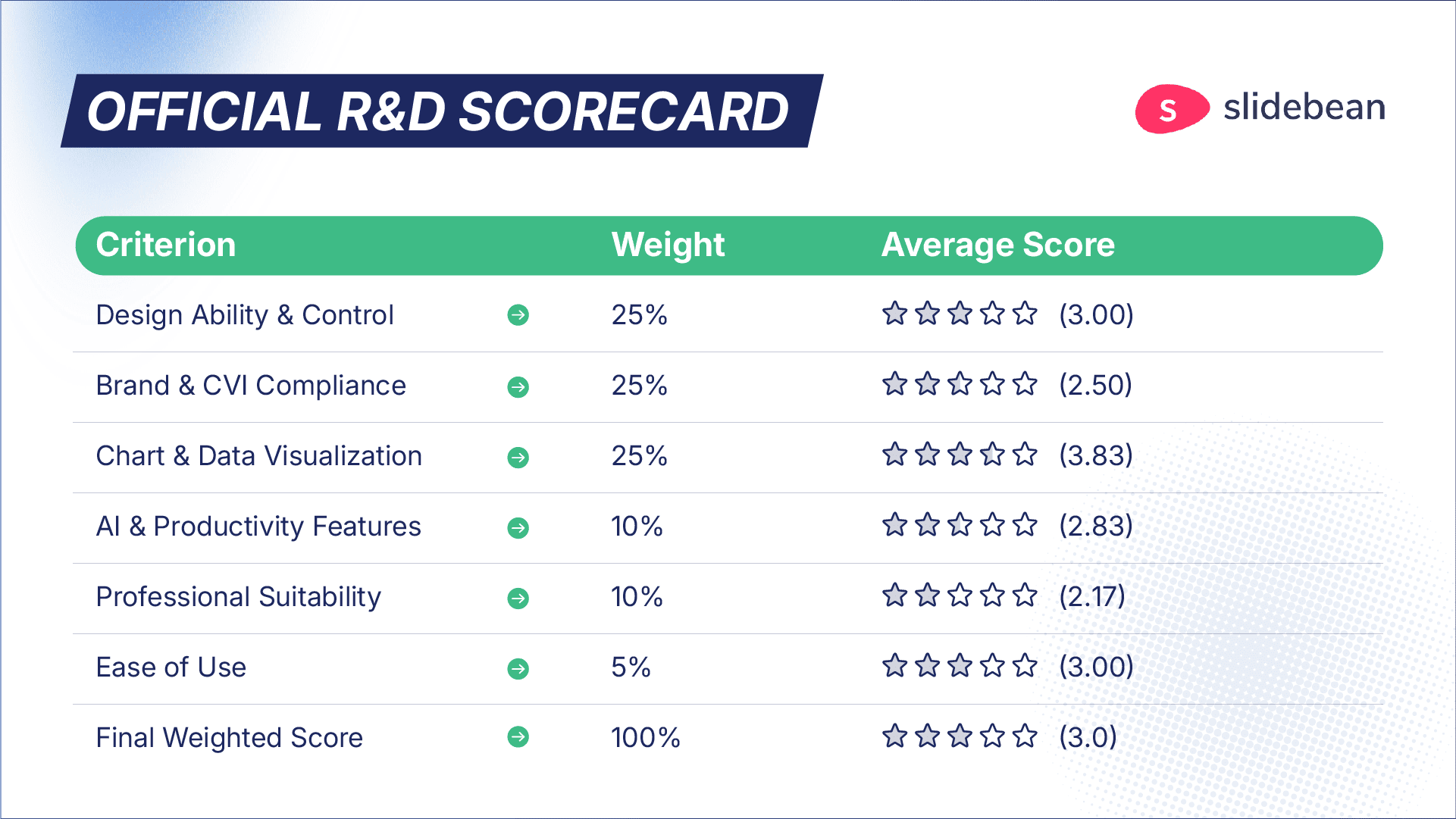
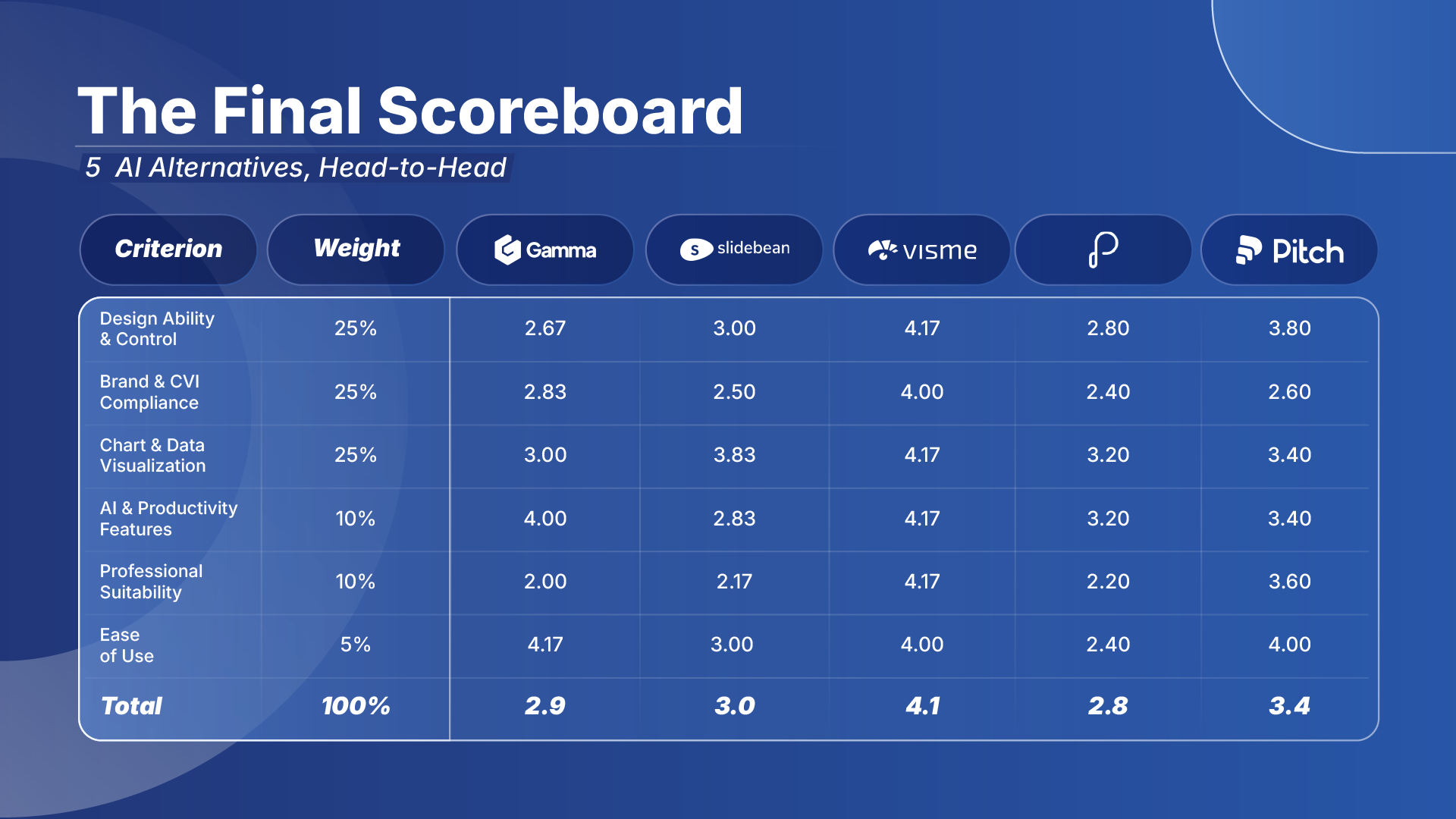
To help you see the complete picture, we’ve compiled the final weighted scores from our R&D tests of Gamma, Slidebean, Visme, Presentations.ai, and Pitch into a single, head-to-head comparison.
This scoreboard summarizes our findings, highlighting the key strengths and weaknesses of each AI alternative when measured against our professional framework. Note that while the final score is a useful guide, the individual criterion scores reveal the most about which tool might be right for your specific needs.
The Final Verdict: Are These Tools Ready for Professional Use?
After rigorous hands-on testing of the five leading AI alternatives to PowerPoint, our R&D team's conclusion is clear: no single AI tool can fully replace PowerPoint in a demanding professional or corporate environment today.
The trade-off is consistent across all platforms. You gain incredible speed in initial content generation and drafting, but you sacrifice the granular design control, robust CVI compliance, and reliable performance that are non-negotiable for high-stakes, brand-critical work. This is the fundamental gap between an AI's automated output and the strategic work of a professional presentation designer.
However, our research also revealed that these tools are not created equal. They exist on a spectrum, each with unique strengths for specific use cases.
- For AI-Powered Content Creation: Gamma and Presentations.ai are the clear leaders. Their ability to generate a full presentation draft from a simple prompt is a revolutionary leap in productivity for initial ideation.
- For Team Collaboration: Pitch stands out as the most mature platform. Its real-time collaboration features, intuitive workflow, and professional interface make it the strongest contender for teams who prioritize a modern, G-Slides-like experience.
- For All-in-One Visuals: Visme offers the broadest creative canvas, excelling at infographics and interactive data visualization, but its performance issues and numerous bugs make it a risky choice for daily professional use.
- For Guided Simplicity: Slidebean is focused on non-designers and startups, enforcing a minimalist aesthetic that is fast but ultimately too restrictive for any custom design work.
All these AI alternatives to PowerPoint excel at accelerating the initial workflow: generating first drafts, creating layouts, and inspiring ideas. But for the final 40% of polish, brand adherence, and the strategic design that separates a professional presentation from a generic one, the control and reliability of a tool like PowerPoint remains essential. This is the "human touch" that perfects an AI's first draft, a process we've refined into our AI-assisted presentation redesign service.
This leads to the core paradox we uncovered: the greatest strength of these AI tools, their enforced simplicity, is also their greatest weakness in a corporate environment. You simply cannot achieve the same level of custom, on-brand results.
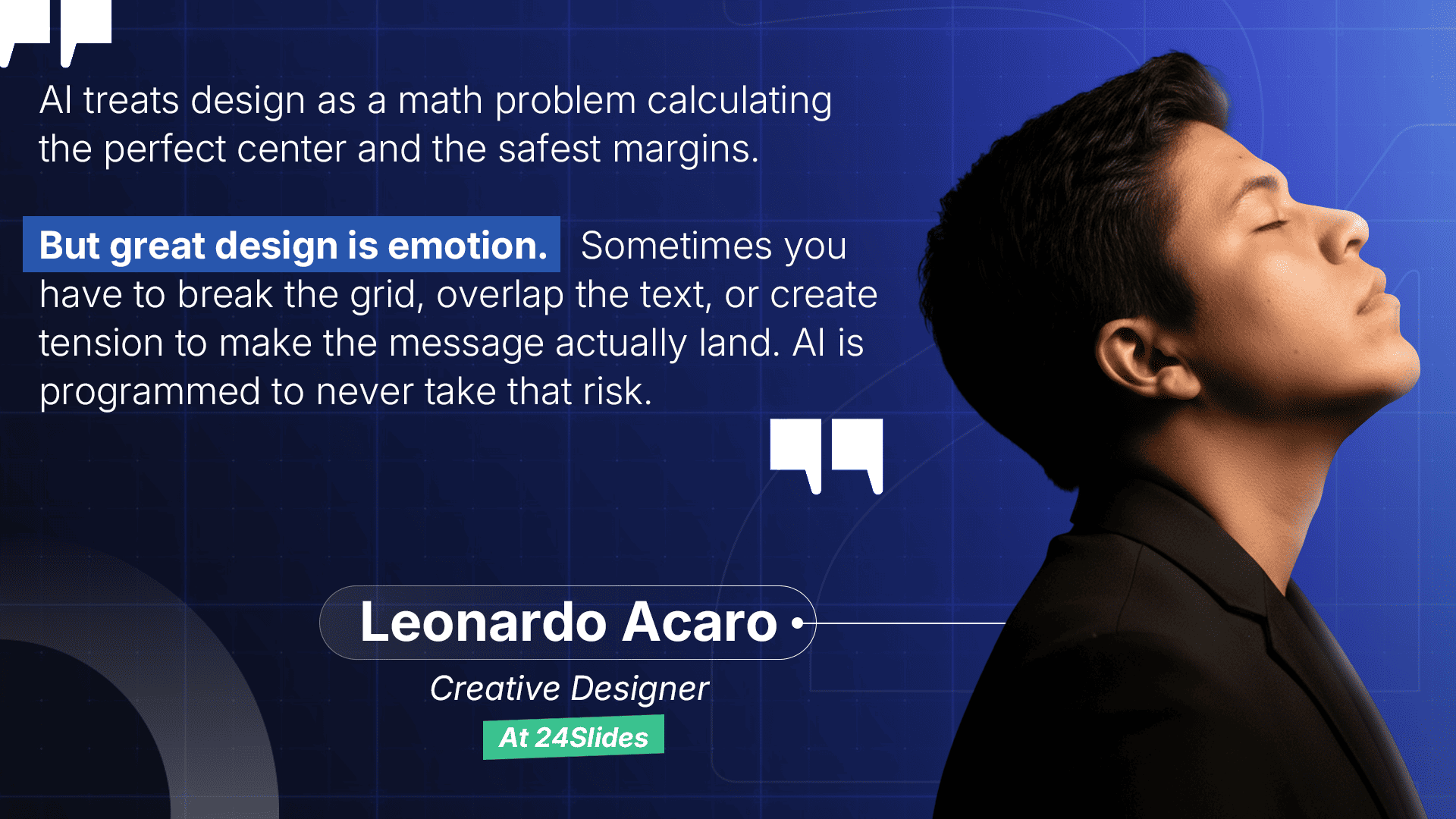
One of our creative designers, Leonardo Acaro, summarized this fundamental gap between AI logic and human creativity perfectly.
A Final Thought: The Proof is in the Process
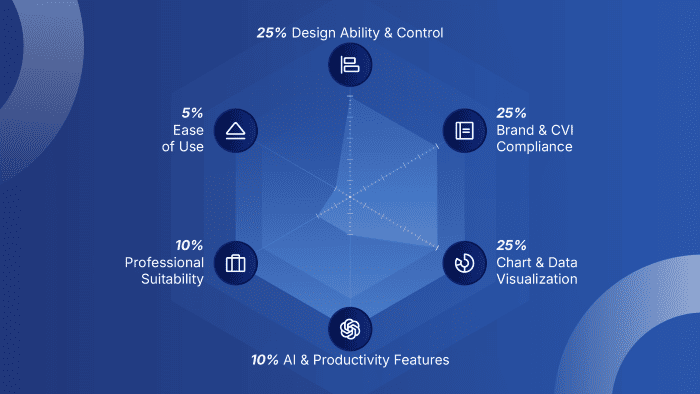
In a way, the creation of this very report provided our final piece of evidence. The evaluation framework graphic presented a classic design challenge. We had an abstract goal: to visually communicate the different weights of our criteria, but no specific execution in mind.
This is precisely the kind of task an AI struggles with: a problem that requires not just execution, but creative interpretation.
Our creative designer, Gabriel Morales, delivered an elegant solution. He used the length of the axes to visually encode the importance of each criterion, while also using a distinct shape to emphasize the most heavily weighted pillars. It’s a small but powerful example of our core finding: AI is a powerful assistant, but for the nuance, strategy, and clever solutions that define professional design, human expertise is irreplaceable.
Frequently Asked Questions (FAQ)
Which AI tool is best for maintaining strict brand consistency?
Based on our tests, Visme offers the most robust brand kit features among the contenders, especially on its paid plans. However, no tool we tested could fully match PowerPoint's ability to lock down master templates and enforce complex CVI compliance, a critical gap for large corporate environments.
Do any of these AI presentation tools offer advanced data visualization?
Visme provides the most visually impressive and interactive data visualization tools, including 3D charts. However, this comes at the cost of performance and deep customization. For creating precise, fully brand-compliant charts, PowerPoint's editor remains the more powerful and reliable option.
Are these AI presentation tools secure enough for confidential corporate information?
This is a critical concern, and our analysis revealed significant risks. Tools like Slidebean, which require uploading videos to public platforms, are unsuitable for any confidential work.
For regulated sectors, the risks go even deeper. This is especially true in the pharmaceutical industry, where precision and compliance are non-negotiable. We explore this in our deep-dive analysis on why generic AI tools fail the pharma test. For any high-security industry, the lack of transparent enterprise-grade security features in these tools presents a significant risk that requires a thorough internal review before adoption.
As a non-designer, which AI alternative to PowerPoint is the easiest to use?
Based on our hands-on testing, Gamma is the clear winner and the easiest AI alternative to PowerPoint for non-designers. Its entire platform is built on a guided, intuitive interface that removes the guesswork from design.
For a non-designer, the features that limit a professional (like the rigid, block-based system) become a major strength, as the AI enforces good design and prevents common mistakes. If you find PowerPoint's blank canvas intimidating and want to create a visually impressive presentation quickly without needing design skills, Gamma is the best tool we tested.
If my main goal is speed, which AI alternative is the fastest way to get from an idea to a finished first draft?
For pure AI-driven generation, turning a prompt or a dense document into a polished first draft, Gamma and Visme are the undisputed leaders. Their ability to generate a complete, well-structured presentation from a single text prompt is a revolutionary feature that PowerPoint lacks. This AI-driven process is the fastest way to create a polished first draft.
However, it's crucial to understand their shared limitation: both tools achieve this speed by sacrificing the granular design control and deep brand compliance that are essential for final, brand-critical work.
About Our Research

This report is the result of a close collaboration between our R&D specialists and our expert design team. It is based on the official "PPT Alternatives Software Trial Project" conducted by 24Slides.
Their mission was to move beyond marketing hype and deliver a true, data-driven verdict on the state of AI presentation tools. The team's combined expertise in rigorous methodology and years of real-world, hands-on design application was essential to creating this comprehensive analysis.
The Team Behind This Analysis:
- Mira Marika — Head of R&D
- Ardhi Firmansyah — Associate Design Manager
- Nadia Tamara — Graphic Designer
- L'Rhey Asmara — Graphic Designer
- Resgy Maulana — Graphic Designer
- Ardhian Zahroni — Graphic Designer
- Alwan Zaidan — Junior Graphic Designer
Beyond AI: Flawless Design & Uncompromising Security
You've seen the data from our R&D report. While AI is a revolutionary tool for first drafts, it consistently falls short in the final 30% of polish, brand adherence, and the strategic design that separates a good presentation from a great one.
But what does that final 30% actually look like in practice? Here is the real-world transformation from an AI's "best effort" to a 24Slides professional redesign.
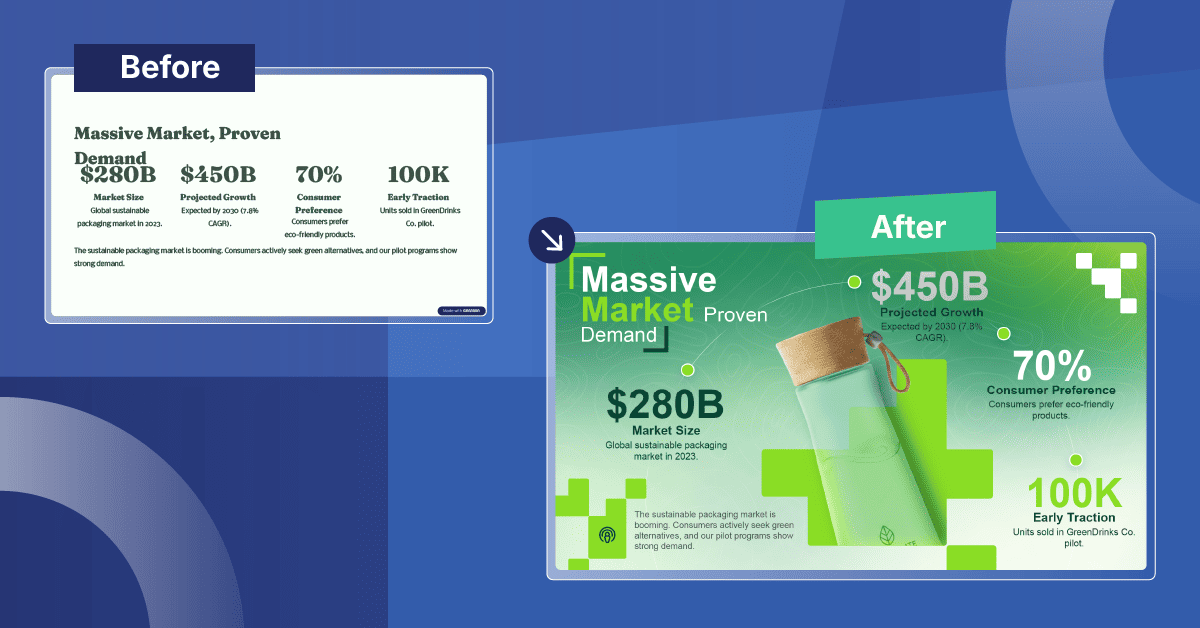
That transformation is the standard of quality we deliver, built on experience from over 1.8 million slides designed for the world's leading companies.
But for a true corporate partner, a professional result is only half the story. The other half is the uncompromising security of your data.
True professional design requires a hybrid model that balances automation with human-led safety checks. For Medical Affairs or Commercial teams, this balance is the only way to avoid regulatory rejection. Learn more about maintaining safety at scale in The Hybrid Model for Pharma Compliance.
Enterprise-Grade Security You Can Trust
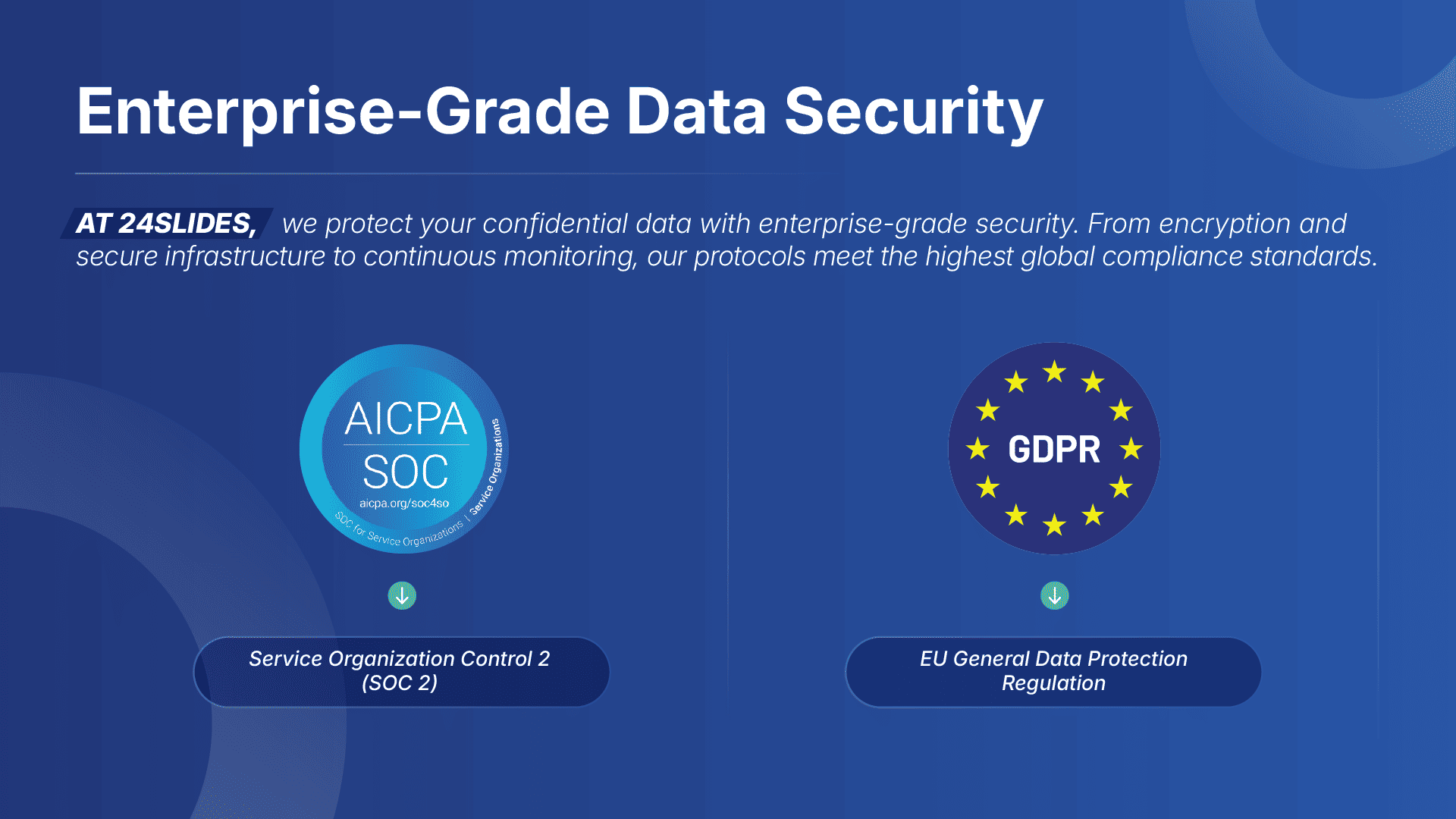
Our commitment to data sovereignty is validated by international benchmarks:
- SOC 2 (Service Control): This verifies that our controls for security and privacy meet rigorous, independently audited standards.
- GDPR (Data Protection): This ensures privacy rights are protected under the world's benchmark for data regulation.
- ISO 27001 Infrastructure: We host our platform on certified data centers (DigitalOcean), ensuring enterprise-grade physical security and server integrity.
- Enterprise NDAs: All projects are protected by strict Non-Disclosure Agreements.
This is why many of our clients are from regulated industries like Pharmaceutical, Biotech, and Financial Services.
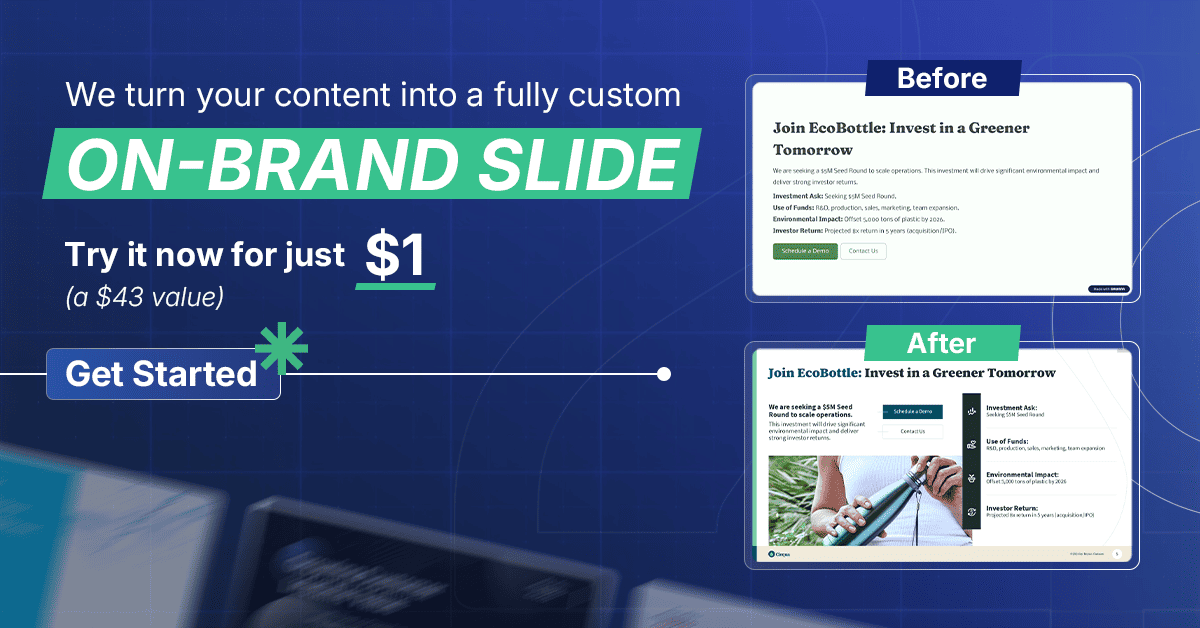
Ready to experience both professional design and peace of mind? For less than the price of a coffee, you can put our expertise to the test.
Prove it to yourself. Get your first slide redesigned for just $1.
Want to dive deeper into the specific tools we analyzed? Check out our detailed reviews and guides.
- AI Presentation Maker vs. Professional Presentation Designer
- AI vs. Human Precision: Why Generic Tools Fail the Pharma Test
- 10 Best AI Presentation Makers for 2026
- Gamma App Review: Best Free AI Presentation Tool?
- Visme AI Review: More Than Just Presentations
- Create a PowerPoint with ChatGPT in Minutes (Free AI Method)